OAuth2 Secured Sessions is a configurable setting in Workflows and Flows that mitigates security risks associated with redirect-based webflows.
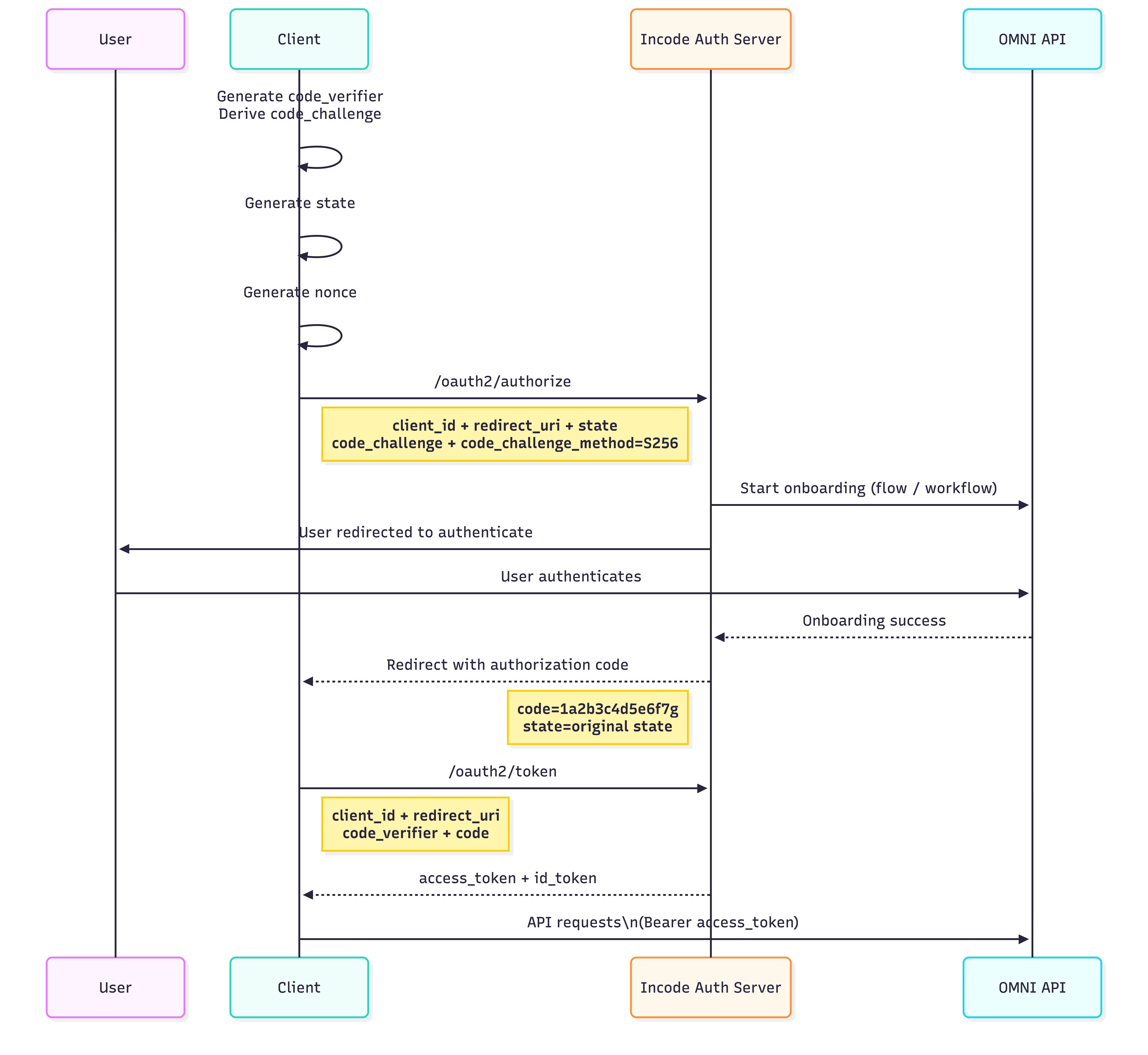
When enabled, the Workflow or Flow runs as part of an OAuth 2.0 / OpenID Connect (OIDC) authorization flow. The onboarding process itself serves as the authentication step. After the user completes onboarding successfully, the authorization server issues an authorization code.
When the OAuth2 Secured setting is enabled on a Workflow or Flow:
- A dedicated OIDC client is automatically generated. This OAuth client ID is visible in the Workflow or Flow settings after saving. The client is configured with:
- Authorization Code grant
- Proof Key for Code Exchange (PKCE) S256
- The Workflow or Flow execution is part of an OIDC authentication process
- A redirect URL becomes mandatory.
- If you change this URL later, you must update it in the Workflow or Flow configuration and in all client authorize and token requests. Mismatches cause authorization failures.
- Disabling and re-enabling the setting regenerates the OAuth client and invalidates the previous one.
When a Workflow or Flow uses OAuth security, the legacy incodesmile.com URL scheme no longer works for that Flow ID. You must use the new URL scheme and authorization pattern described below. This prevents security gaps caused by manual URL tampering.
Security Model
The generated OAuth client uses Proof Key for Code Exchange (PKCE) (RFC 7636) and does not require a client secret. This makes the secured session flow suitable for Single Page Applications (SPAs), mobile applications, or any client unable to securely store secrets.
PKCE protects the authorization code from interception by binding it to a cryptographically random verifier known only to the client.
OpenID Connect (OIDC) Authorization Flow
The following diagram shows the sequence of a successful onboarding using OIDC:
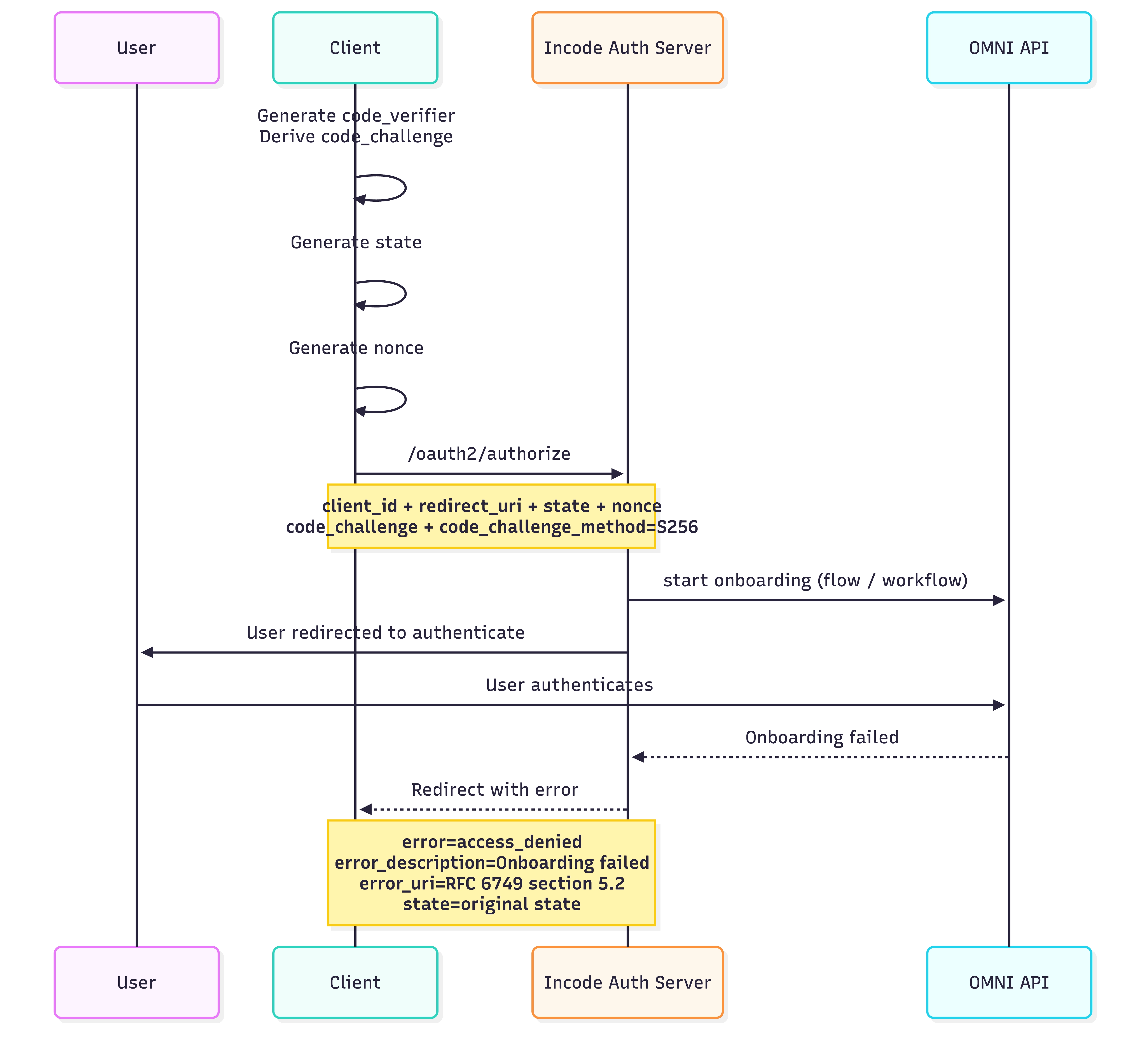
The following diagram shows the sequence of a failed onboarding using OIDC:
Step 1: Authorization Request (/oauth2/authorize)
Before initiating the authorization request, the client must:
Generate a cryptographically random
code_verifierand store itCompute the
code_challengeby hashing thecode_verifierwith SHA-256Generate a
stateparameter that is used for CSRF protection. The value should be:- Cryptographically random
- High entropy (unguessable)
- Unique per authorization request
Store
statein memory for SPAs, or in a secure session cookie or session-keyed in-memory cache for a Backend for Frontend (BFF) layer. For more detail, see RFC 6749 §10.12.Generate a
nonceparameter to prevent ID token replay attacks. The value should be:High-entropy
Unique per authentication request
Same quality as state
Store
noncethe same way you storestate. For more detail, see the OIDC nonce notes.
The well-known endpoint for automatic discovery of configuration, endpoints, and key sets is at https://auth.incode.com/.well-known/openid-configuration.
Authorization Request Parameters
| Parameter | Description |
|---|---|
client_id |
OAuth Client ID generated and stored in the Workflow/Flow settings. |
redirect_uri |
Redirect URI configured in the Workflow/Flow settings. |
response_type |
code |
scope |
openid |
state |
Opaque value used to maintain request/response integrity |
nonce |
Value used to associate the ID Token with the client session and prevent replay attacks |
code_challenge_method |
S256 |
code_challenge |
Generated PKCE challenge |
response_mode |
form_post |
external_customer_idOptional |
ID that identifies user in clients external system |
Example Authorization Request
https://auth.incode.com/oauth2/authorize
?client_id={client_id}
&redirect_uri={redirect_uri}
&scope=openid
&response_type=code
&response_mode=form_post
&state={state}
&nonce={nonce}
&code_challenge_method=S256
&code_challenge={codeChallenge}
&external_customer_id={external_customer_id}
Here's what this request does:
- The user is redirected to the Incode authorization server.
- The associated Workflow or Flow runs as part of the
/authorizeendpoint. - If onboarding succeeds:
- The user is redirected back to
redirect_uri. - An authorization code and
stateare returned in the URL. - The client must verify the
stateparameter on callback by comparing the returned value to the stored one. If it's missing or doesn't match, abort the process.
- The user is redirected back to
- If onboarding fails:
- The user is redirected back to
redirect_uri. - Error and error description parameters are included in the URL (see the OIDC error spec).
- The user is redirected back to
Step 2: Token Exchange (/oauth2/token)
The client exchanges the authorization code for tokens. Client authenticates using the code_verifier generated in Step 1.
Token Request Parameters
| Parameter | Description |
|---|---|
grant_type |
authorization_code |
code |
Authorization code from Step 1 |
client_id |
Client ID used in the authorize request |
redirect_uri |
Redirect URI used in the authorize request |
code_verifier |
Original PKCE code verifier |
Example Token Response Body
{
  "access_token": "eyJraWQiOiI2MzM2NjAy....zAZ4-FboQg",
  "scope": "openid profile",
  "id_token": "eyJraWQiOiI2MzM2NjAyYy05....O3dDfO13Yyg",
  "token_type": "Bearer",
  "expires_in": 86399
}
After a successful response, client must validate ID token. Validation must confirm that:
- The issuer identifier exactly matches the
issclaim. - The
audclaim contains the client'sclient_idvalue. - The JWS signature is valid, using the algorithm in the JWT header and the public key from the issuer's well-known JWKS endpoint.
- The current time is before the
expclaim. - The
nonceclaim exactly matches thenoncevalue the client sent in the authentication request.
Access token validation is the responsibility of the Omni server, and happens in Step 3.
Step 3: API Access
Use the access_token from Step 2 as a Bearer token in the Authorization header instead of the x-incode-hardware-id header. The token:
- Is required to access Omni APIs
- Is bound to a single session
- Follows standard OAuth 2.0 token validation rules
Example curl request with OAuth Secured Workflows/Flows
curl --location 'https://saas-api.incodesmile.com/omni/get/score' \
--header 'Content-Type: application/json' \
--header 'api-version: 1.0' \
--header 'x-api-key: 13cf313e0db1507e77bf8d0631f3ca736173ccde' \
--header 'Authorization: Bearer eyJraWQiOiI2MzM2Nj.....Lf_N7hww'
You can use this token with the following endpoints:
omni/get/scoreomni/get/custom-fieldsomni/get/onboarding/statusomni/get/ocr-data