The Review OCR Data module extracts text from a captured identity document using Optical Character Recognition (OCR). It then shows that text to the user to confirm it's correct before the session continues. When enabled, users can correct missing or misread fields.
For an overview of this module and how it works, see Review OCR Data.
Supported with:
✅ Workflows | ❌ Flows
Add Review OCR Data to Workflows
- In the left menu, click Flow Builder > Workflows.
- Click New or select an existing Workflow.
- From the Modules list, drag and drop the Review OCR Data module into the builder. Place it after the ID Capture module.
- You can click the three dots > Edit on the module node to open the Configuration Options panel and adjust settings as needed.
Configuration Options
After changing anything, click Save Configurations before closing the configuration panel.
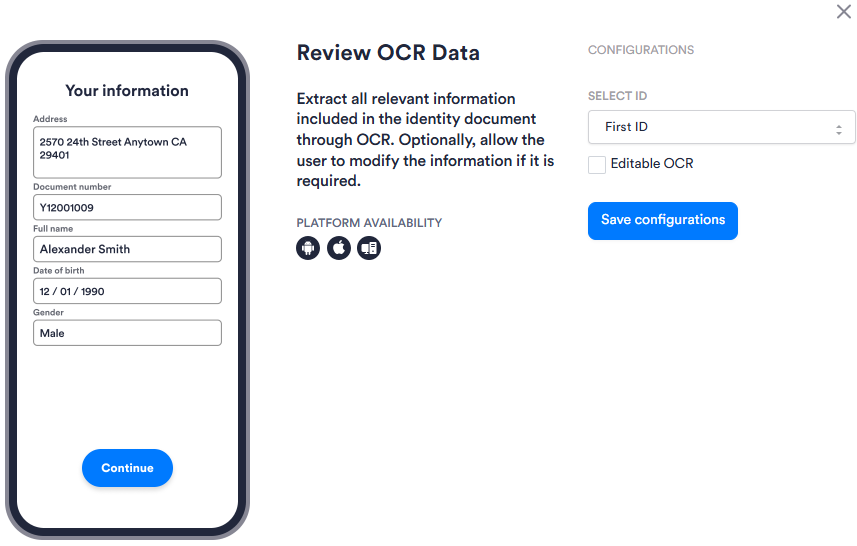
| Setting | Description |
|---|---|
| Select ID | Specifies which ID in a multi-ID Session this module applies to: First ID or Second ID. Use this when your Workflow captures more than one identity document. |
| Editable OCR | Allows the user to edit and correct the OCR-extracted values displayed on the review screen. Useful when a field is missing or was misread: for example, when an address is not detected on the document. Enabling this setting may require back-end enablement. Contact your Incode Representative for more information. |