The Custom Fields module captures additional user-provided data and saves it to the Session, making it available for reporting, server-side decisions, or cross-checking later in the journey.
Warning
This module is deprecated. Existing implementations may continue use, but it is not available in new implementations.
Before adding this module, make sure you've defined your custom fields in Dashboard in Configuration > General. Each field requires a name and a type. Once defined, those fields appear as selectable options in the module configuration panel.
For an overview of this module and how it works, see Custom Fields.
Supported with:
❌ Workflows | ✅ Flows
Add Custom Fields to Flows
- In the left menu, click Flow Builder > Flows.
- Click New or select an existing Flow.
- On the Select Modules tab, find the Custom Fields module and click Add.
- You can click Details & Configurations to open the Configuration Options panel and adjust settings as needed.
Info
Note
Adding the module enables the UI-collection path. Users will be prompted to complete the fields during the Flow. If you don't add the module, the field values must instead be supplied through the backend via API.
Configuration Options
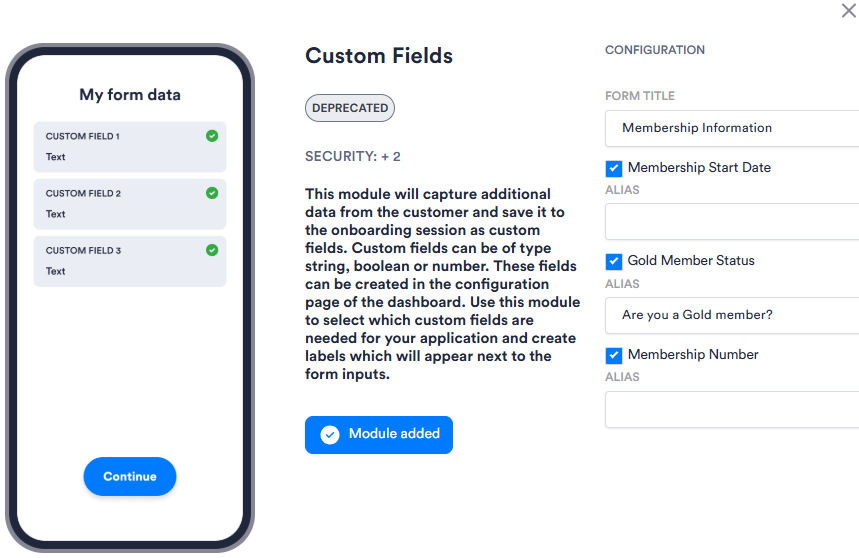
| Setting | Description |
|---|---|
| Form Title | The heading shown at the top of the form presented to the user. |
| Custom field checkboxes (field names variable) | The fields available to include. Select the checkbox for each field you want to include in the form. |
| Alias | An optional override for the field's display label. If left blank, the field's name is used. |