Flows are the legacy method for defining onboarding and authentication experiences in Dashboard. They run modules in a fixed order without conditional logic or branching. We recommend Workflows for all new implementations. Flows remain fully supported, but new capabilities are being built on Workflows.
Workflows
Workflows allow you to create and customize user journeys, like the one shown below.
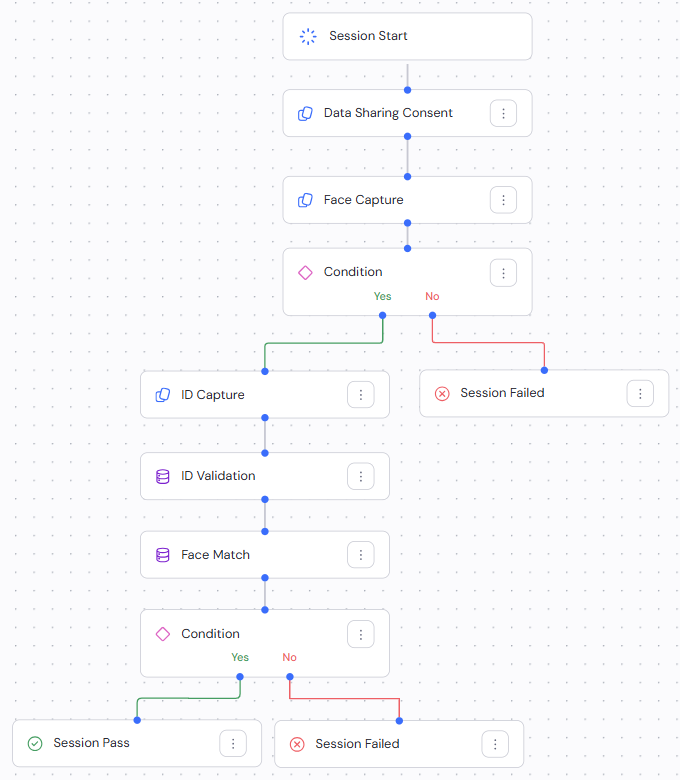
Workflows offer a more flexible, no-code solution for building verification experiences in Dashboard. Key capabilities include:
- Customizable module ordering: Specify the sequence for verification steps.
- Conditional branching: Create dynamic user journeys based on specific criteria, user inputs, or verification results.
- Multi-layered verification: Combine multiple verification methods to enhanced reliability.
- Dynamic interface: Manage and visualize the verification journey in a user-friendly interface.
Learn how to configure Workflows in Dashboard.
Nodes
Individual elements within a Workflow. There are four types of nodes:
- Module nodes: Represent end-user interaction. Every Module node has a specific set of configuration options. Module nodes usually collect user data. They sometimes require a specific Process node to perform data manipulation and additional checks. User Consent and ID Capture are examples of Module nodes.
- Process nodes: Non-interactive nodes for data processing. Place a Process node after a relevant Module node. For example, a Face Match Process node would follow a Face Capture and ID Capture Module node. Process nodes have set configuration options.
- Condition nodes: Branch the user journey based on collected data. You can combine Condition nodes using the logical operators AND and OR to define different steps in the user journey based on the condition result. Each Yes and No branch can contain any type of Workflow node to collect more data, perform additional processing, or end the user journey. Learn more about conditions.
- Result nodes: Specify the end result of the session. Every Workflow branch must end with a Result node. Session status Result nodes can have one of the following values:
OK,FAIL,MANUAL, orWARN.
Templates
Incode offers various Workflow templates for specific use cases that represent common business needs. These include:
- Standard identity verification
- Age verification
- Setup verification
You can create a Workflow from a template to quickly launch it to your users.
Integration
Integrating Workflows into your application or website is crucial to using the full capabilities of the Incode Platform. You can integrate using any of the following options, according to your needs:
- Direct onboarding URLs
- iFrame integration
- SDKs for iOS, Android, and hybrid platforms
Each option provides a seamless way to incorporate identity verification into your user flow, enhancing user experience and security. Learn more about integration options.