The Data Sharing Consent module shows the user one or more preconfigured consents to review and accept, then records their agreement. Consents obtain the user's permission to collect and process their data. Most jurisdictions require this at the start of an identity verification journey. Incode includes default consent language that covers common regulatory requirements. You can use only the default consent, create your own to match your requirements, or use a combination of both.
Integrations
✅ Web | ✅ iOS | ✅ Android | ⚠️ React Native coming soon
How It Works
This module asks permission from the user to collect the information and photos required for verification. The module adapts to your organization's needs. You can:
- Localize the consent screen into any language your users speak
- Write custom titles, descriptions, and terms using markdown for rich formatting
- Mark each checkbox as mandatory or optional
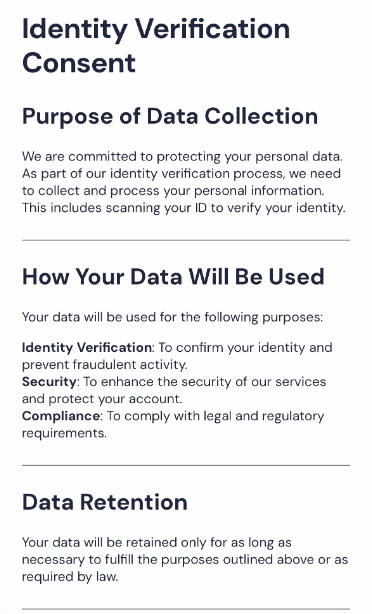
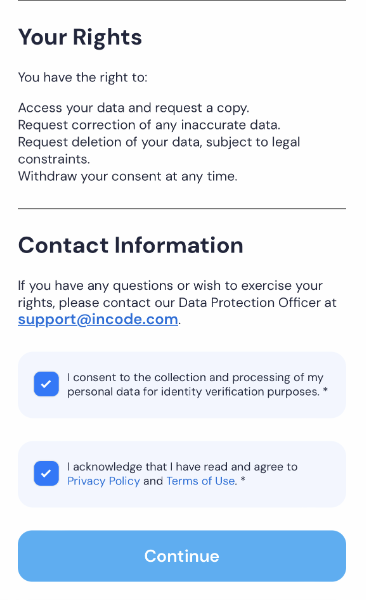
View an example consent
This example consent displays to the user:
- A clear title.
- Detailed consent information.
- Mandatory and optional consent checkboxes.
- A "Continue" button that is enabled only after all mandatory consents are checked.
You create and manage consents in Dashboard. You can view Data Sharing Consent module results on the Other tab in single Session view.
Use Data Sharing Consent
For instructions on implementing and configuring Data Sharing Consent on each supported platform, use the following pages:
- Data Sharing Consent (Dashboard)
- Combined Consent (iOS)
- Combined Consent (Android)
- Consent Module (Web SDK)
- Combined Consent (React Native)
- Combined Consent (Flutter)
To view the end user experience screens and customization options for this module, see Data Sharing Consent: Design and UX.