The Proof of Address module captures a proof-of-address document, such as a utility bill, bank statement, or telecom agreement, as an image or PDF. It then extracts the address data through OCR to validate the user's residential address.
For an overview of this module and how it works, see Proof of Address Capture.
Supported with:
✅ Workflows | ✅ Flows
Add Proof of Address Capture to Workflows
- In Dashboard, find Build & Verify in the left menu. Select Flow Builder > Workflows.
- Click New or select an existing Workflow.
- From the Modules list, drag and drop the Proof of Address Capture module into the builder.
- You can click the three dots > Edit on the module node to open the Configuration Options panel and adjust settings as needed.
Add Proof of Address Capture to Flows
- In Dashboard, find Build & Verify in the left menu. Select Flow Builder > Flows.
- Click New or select an existing Flow.
- On the Select Modules tab, find the Proof of Address Capture module and click Add.
- You can click Details & Configurations to open the Configuration Options panel and adjust settings as needed.
Configuration Options
After making changes on any tab, click Save Configurations to apply them.
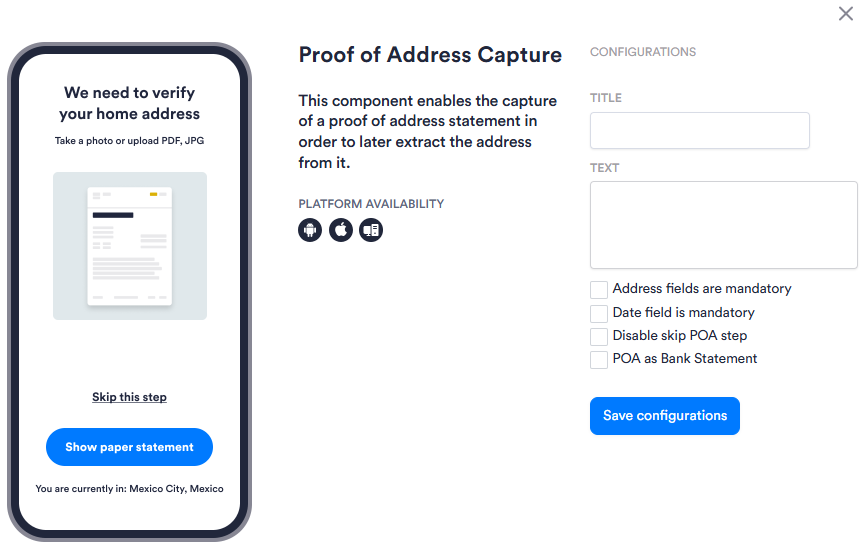
| Setting | Description |
|---|---|
| Title | Custom title text displayed to the user on the Proof of Address Capture screen. Leave blank to use the default title. |
| Text | Custom body text displayed to the user on the Proof of Address Capture screen. Leave blank to use the default text. |
| Address fields are mandatory | When enabled, the user must recapture their document if a valid address cannot be extracted from it. |
| Date field is mandatory | When enabled, the user must recapture their document if a required date cannot be extracted from it. |
| Disable skip POA step | When enabled, the user cannot skip the Proof of Address Capture step. By default, the step includes a skip option. |
| POA as Bank Statement | When enabled, submitted documents are routed through a bank statement processor instead of the standard proof-of-address processor. Enable this when you expect users to submit bank statements as their proof of address. |