The External Decision module calls a configured external endpoint and exposes the returned decision value for routing Conditions.
For an overview of this module and how it works, see External Decision.
Supported with:
✅ Workflows | ❌ Flows
Prerequisites
Before adding the External Decision node to a Workflow, the client must:
- Expose an endpoint that accepts the Incode payload (
sessionId,identityId,flowId,timestamp) and returns a singledecisionstring. - Secure the endpoint with OAuth 2.0 (client credentials) and issue Incode a Client ID and Client Secret.
- Define the set of
decisionvalues the endpoint will return (for example,valid,blocked,on_hold). These exact strings are used when configuring routing conditions.
Add External Decision to Workflows
- In the left menu, click Flow Builder > Workflows.
- Click New or select an existing Workflow.
- Ensure you have at least one Module node in the builder.
- From the Processes list, drag and drop the External Decision module into the builder. Place it after an authentication module only if the decision depends on
identityId. - Click the three dots > Edit on the node to open the Configuration Options panel and configure the endpoint, authentication, and routing.
Configuration Options
After making changes, click Save configurations to apply them.
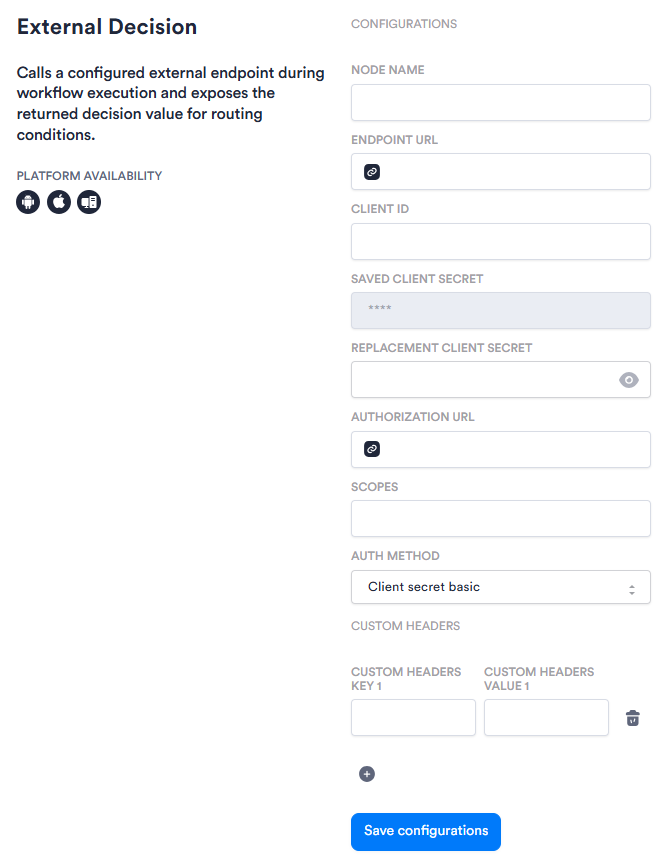
The options you see in your configuration may differ from those documented below. Contact your Incode representative for more information.
| Setting | Description |
|---|---|
| Node Name | The reference used for this node in routing conditions (for example, eligibility_status). Conditions act on the returned decision string using this name as the reference. |
| Endpoint URL | The client-owned endpoint that Incode calls when the Workflow reaches this node. |
| Client ID | The identifier the client issues to Incode for the OAuth client-credentials grant. |
| Saved Client Secret | Displays the masked Client Secret currently saved for this node. Read-only. To change the value, enter a new one in Replacement Client Secret. |
| Replacement Client Secret | Enter a new Client Secret value here to replace the one currently saved. Use the visibility toggle to ensure your new secret is correct before saving. After you click Save configurations, the value is masked. |
| Authorization URL | The client's OAuth token endpoint. Incode requests an access token from this URL on each execution. |
| Scopes | The OAuth scopes Incode requests when obtaining an access token. |
| Auth Method | How Incode presents its credentials to the token endpoint. Options are Client secret basic and Client secret post. |
| Custom Headers | Optional static headers that Incode sends as-is on every request to the endpoint (for example, an API gateway key). Add additional key/value pairs using the + button. Custom header values are not masked in the configuration UI. |
Add a Condition
After configuring the module, add Condition nodes that act on the returned decision string. Reference the node by the Node Name configured above (for example, eligibility_status == "valid").
Example routing for a status look-up:
valid→ continue to the next moduleblocked→ block accesson_hold→ trigger step-up identity verificationINCODE_UNRESOLVED→ handle failure (no response within 30 seconds, error, unavailable endpoint, or unmatched value)
Decision string matching is case-sensitive. Returned values must exactly match the strings configured in conditions, or the outcome maps to INCODE_UNRESOLVED.
Observability
A session event is emitted on every execution, capturing the endpoint called, the decision value, the optional reason field if returned, and the branch taken. Credentials are never exposed in logs or the flow definition.