The Antifraud Check module compares the current Session against prior Sessions and known identities to detect signs of fraud.
For an overview of this module and how it works, see Antifraud Check.
Supported with:
✅ Workflows | ✅ Flows
Add Antifraud Check to Workflows
- In Dashboard, find Build & Verify in the left menu. Select Flow Builder > Workflows.
- Click New or select an existing Workflow.
- From the Processes list, drag and drop the Antifraud Check module into the builder. It must come after a module from the Modules list.
- You can click the three dots > Edit on the module node to open the Configuration Options panel and adjust settings as needed.
Add Antifraud Check to Flows
- In Dashboard, find Build & Verify in the left menu. Select Flow Builder > Flows.
- Click New or select an existing Flow.
- On the Select Modules tab, find the Antifraud Check module and click Add.
- You can click Details & Configurations to open the Configuration Options panel and adjust settings as needed.
Configuration Options
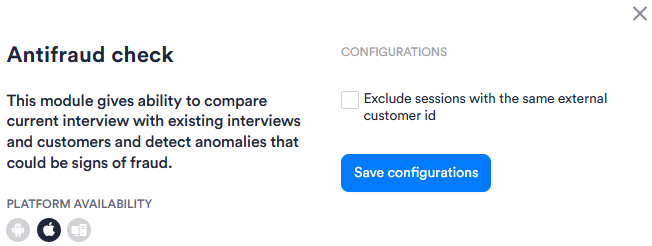
After making changes, click Save Configurations to apply them.
View image of Workflow configuration panel
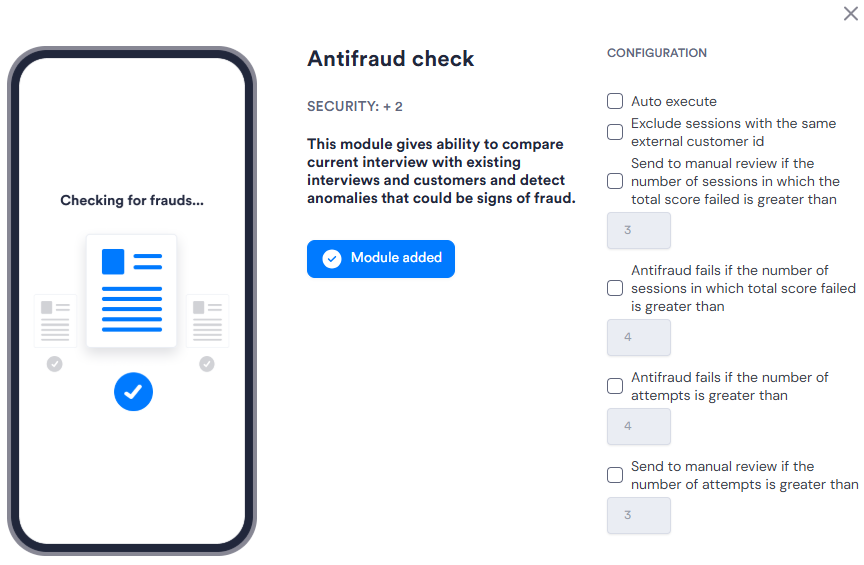
View image of Flow configuration panel
| Setting | Description |
|---|---|
| Auto execute Flows only |
When enabled, the module runs automatically after biometric and document data are collected. |
| Exclude sessions with the same external customer id | When enabled, Sessions that share the same external customer ID are excluded from the fraud comparison. |
| Send to manual review if the number of sessions in which the total score failed is greater than Flows only |
When enabled, sends the Session to manual review if the count of Sessions where the total fraud score failed exceeds the specified threshold. Default: 3. |
| Antifraud fails if the number of sessions in which total score failed is greater than Flows only |
When enabled, causes the Antifraud Check to fail if the count of Sessions where the total fraud score failed exceeds the specified threshold. Default: 4. |
| Antifraud fails if the number of attempts is greater than Flows only |
When enabled, causes the Antifraud Check to fail if the total number of attempts exceeds the specified threshold. Default: 4. |
| Send to manual review if the number of attempts is greater than Flows only |
When enabled, sends the Session to manual review if the total number of attempts exceeds the specified threshold. Default: 3. |