The Certificate Issuance module issues a digital certificate tied to a verified identity, supporting legally binding and compliant document signing.
For an overview of this module and how it works, see Certificate Issuance.
Supported with:
✅ Workflows | ✅ Flows
Add Certificate Issuance to Workflows
- In Dashboard, find Build & Verify in the left menu. Select Flow Builder > Workflows.
- Click New or select an existing Workflow.
- From the Modules list, drag and drop the Certificate Issuance module into the builder.
- You can click the three dots > Edit on the module node to open the Configuration Options panel and adjust settings as needed.
Add Certificate Issuance to Flows
- In Dashboard, find Build & Verify in the left menu. Select Flow Builder > Flows.
- Click New or select an existing Flow.
- On the Select Modules tab, find the Certificate Issuance module and click Add.
- You can click Details & Configurations to open the Configuration Options panel and adjust settings as needed.
Configuration Options
After making changes, click Save Configurations to apply them.
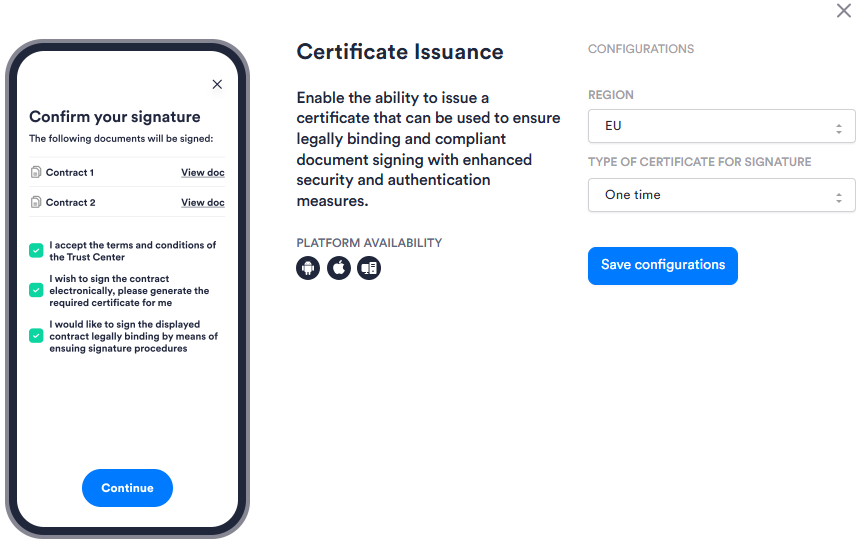
| Setting | Description |
|---|---|
| Region | The region in which the certificate is issued. Select the region that corresponds to the applicable regulatory framework for your use case: for example, EU. Contact your Incode Representative to enable this option for your organization. |
| Type of Certificate for Signature | The certificate validity type used for document signing: One Time (10 minutes; best for single-document, single-signature scenarios), Short Term (30 minutes to 24 hours; best for multiple transactions or documents within the same Session), or Long Term (10 days to 2 years in Mexico, and up to 3 years in the EU; best for ongoing use). |