The Government Record Verification module verifies a person's identity by comparing identity attributes and, where supported, a live selfie against government-held records, producing a match or no-match outcome.
For an overview of this module and how it works, see Government Record Verification.
Supported with:
✅ Workflows | ✅ Flows
Add Government Record Verification to Workflows
- In the left menu, click Flow Builder > Workflows.
- Click New or select an existing Workflow.
- From the Processes list, drag and drop the Government Record Verification module into the builder.
- You can click the three dots > Edit on the module node to open the Configuration Options panel and adjust settings as needed.
Add Government Record Verification to Flows
- In the left menu, click Flow Builder > Flows.
- Click New or select an existing Flow.
- On the Select Modules tab, find the Government Record Verification module and click Add.
- You can click Details & Configurations to open the Configuration Options panel and adjust settings as needed.
Configuration Options
This section details all the configuration options available for this module. After changing anything, click Save configurations before closing the configuration panel.
The options you see in your configuration may differ from those documented below. Contact your Incode representative for more information.
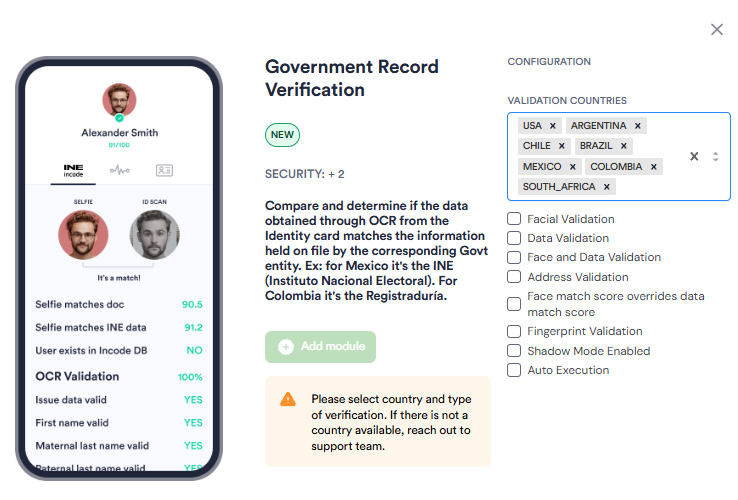
| Setting | Description |
|---|---|
| Validation Countries | The countries for which government verification is performed. Select one or more countries from the drop-down menu. Verification will only run for documents issued by the selected countries. If the country you need is not available, contact your Incode representative. |
| Data Validation | Compares identity attributes extracted from the ID, such as name and date of birth, against the government record for the selected country. |
| Facial Validation | Compares the live selfie biometric against the government portrait for the selected country. |
| Face and Data | Performs a biometric comparison of the user's selfie against the photo in the government record alongside identity attribute matching. |
| Use Cropped Id Face Photo | Only relevant for USA. When selected, the verification uses the photo captured from the front of the ID for biometric comparison instead of a live selfie. |
| Face Match Override Data Score | Prioritizes the result of the face match check over the data verification score when determining the overall outcome. |
| Fingerprint Validation | Only relevant for Mexico. The minimum number of fingerprints that must match for the fingerprint validation check to pass. Default: 1. See INE Fingerprint Validation for more details. |
| Fingerprint Match Override Score | Only relevant for Mexico. Prioritizes the result of the fingerprint match check over other scores when determining the overall outcome. See INE Fingerprint Validation for more details. |
| Auto Execution | The verification check runs automatically when the Flow or Workflow reaches this module. |