The Document Capture module captures a supplementary document, such as a proof of address document, medical document, or bank statement. Users can upload a file or take a photo of the document with their device’s camera.
Submitted documents appear in the Other tab in single Session view.
For an overview of this module and how it works, see Document Capture.
Supported with:
✅ Workflows | ✅ Flows
Add Document Capture to Workflows
- In Dashboard, find Build & Verify in the left menu. Select Flow Builder > Workflows.
- Click New or select an existing Workflow.
- From the Modules list, drag and drop the Document Capture module into the builder.
- You can click the three dots > Edit on the module node to open the Configuration Options panel and adjust settings as needed.
Add Document Capture to Flows
- In Dashboard, find Build & Verify in the left menu. Select Flow Builder > Flows.
- Click New or select an existing Flow.
- On the Select Modules tab, find the Document Capture module and click Add.
- You can click Details & Configurations to open the Configuration Options panel and adjust settings as needed.
Configuration Options
After making changes on any tab, click Save configurations to apply them.
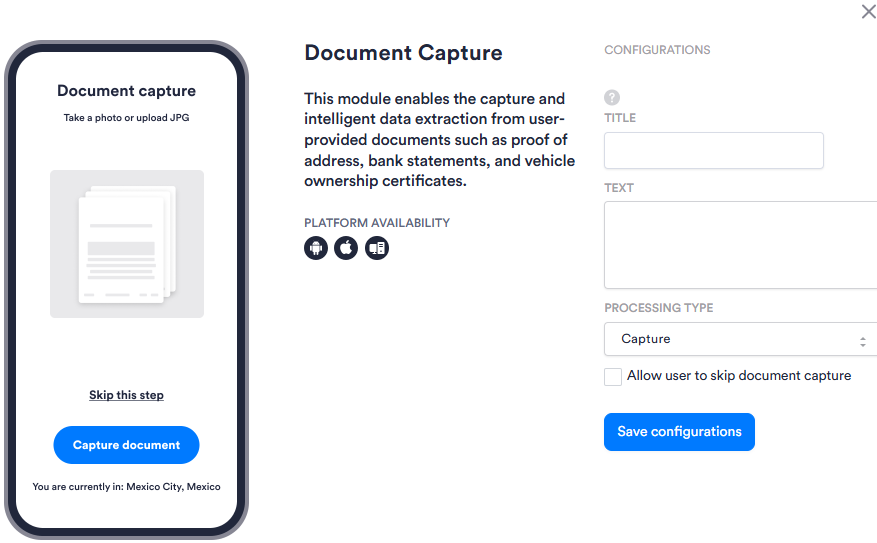
| Setting | Description |
|---|---|
| Title | Custom title text displayed to the user on the document capture screen. Leave blank to use the default. |
| Text | Custom instructional text displayed to the user on the document capture screen. Leave blank to use the default. |
| Processing Type | Determines how the captured document is processed after submission. Select one of the following options: Capture, Process Proof Of Address OCR, Process Letter Of Authorization OCR, Process Asylum Seeker Visa ZAF OCR, Process Bank Statement OCR, Process Voided Check OCR, Process V5C Logbook, Process Car Invoice, Process Circulation Card, Process Finance Settlement, or Process Mexican INE as POA. |
| Allow user to skip document capture | When enabled, users can bypass the document capture step and continue without submitting a document. |