# ID Validation
## Introduction
Depending on the type of ID document the user has provided, up to three endpoint calls may be required to validate the ID. If a document only has one side, such as a passport, there is no need to call the `back-id` endpoint. However, endpoints should be called in the general order shown:
1. Add front side of ID `/omni/add/front-id/v2`
2. Add back side of ID `/omni/add/back-id/v2`
3. Process Id `/omni/process/id`
> 📘 Can I reprocess an ID using an existing upload?
>
> No. If you need to reprocess an ID, you must repeat the upload of ID images before calling the `/omni/process/id` endpoint again.
## Header requirements
Each of the three endpoints requires these header values.
| Header | Value |
| :--------------------- | :--------------------------------------------------------------------------------------- |
| `x-api-key` | The API key provided to you by Incode |
| `api-version` | "1.0" |
| `X-Incode-Hardware-Id` | The Session Token obtained when you started the onboarding session. |
## Body/image requirements
Images of ID documents must be provided in the request body as a base64 encoded string. Both front and back ID images are subject to these requirements:
* Images should be at least 1000 pixels on one dimension, either width or height.
* Requests cannot exceed 10 MB. See [limitations of the API](ref:introduction) for more information.
* IDs must be fully visible in the image. No edges or corners should be removed. Otherwise, the image is invalid.
* There should be some padding (space) between the image edges and the ID edges, as illustrated here. Otherwise, the image is invalid.
| Image | Description |
| :----------------------------------------- | :--------------------------------------------------------------------------------------------- |
| 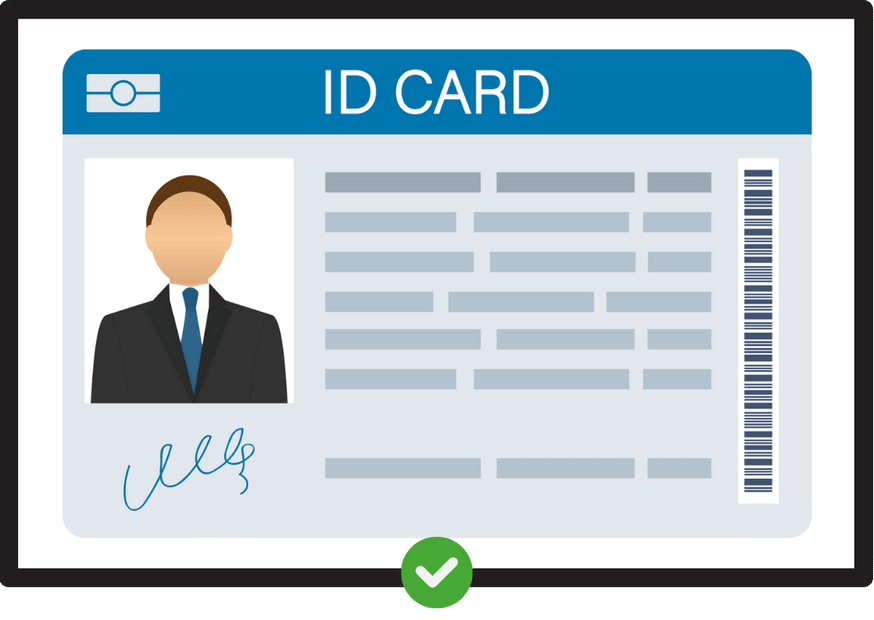 | Valid image. There's a clear padding between the ID and the image borders. Id is fully visible |
| 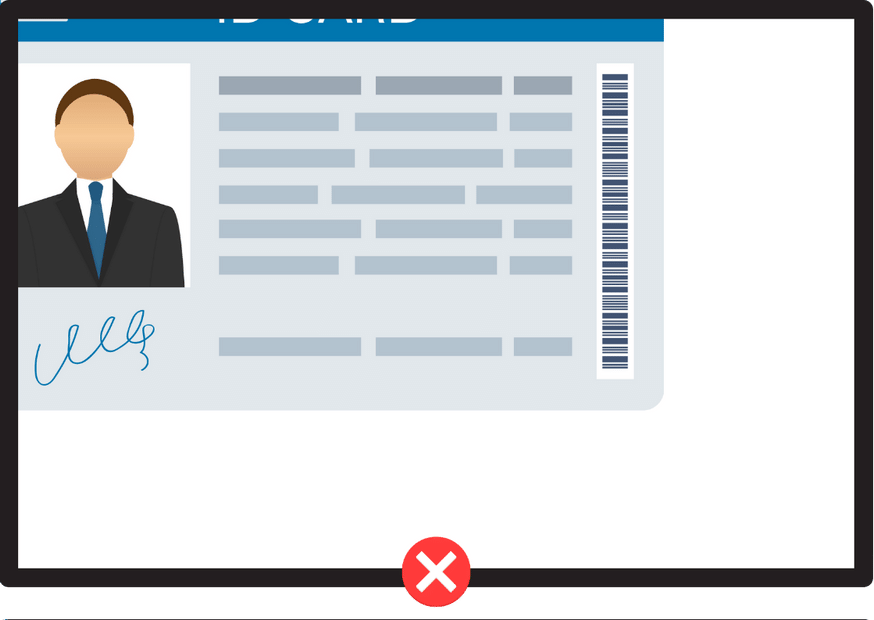 | Invalid image. The ID is cropped and not fully visible |
| 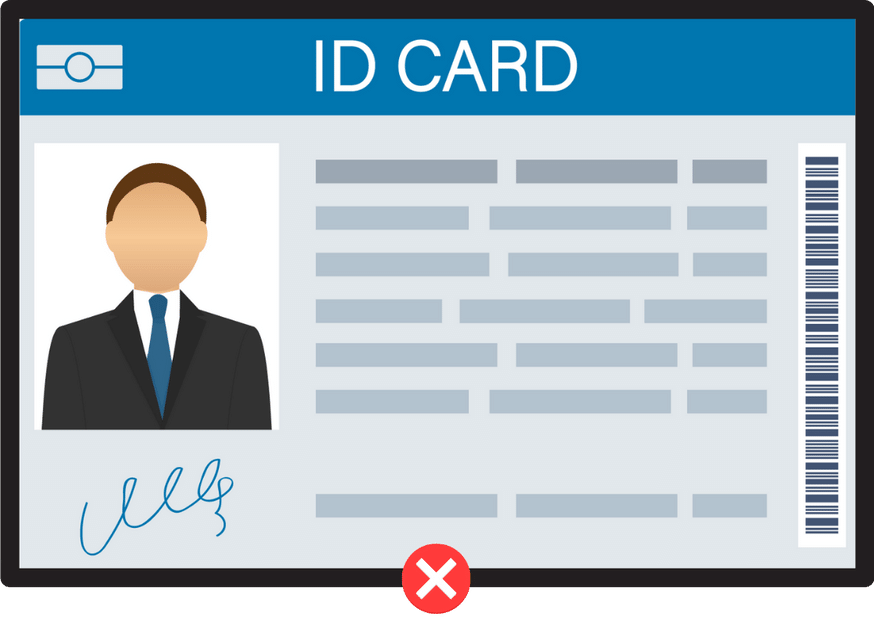 | Invalid image. While the ID is fully visible, there's no padding with the image borders. |
## Sample Code
### Front Id
```curl
curl --location 'https://demo-api.incodesmile.com/omni/add/front-id/v2' \
--header 'Content-Type: application/json' \
--header 'api-version: 1.0' \
--header 'x-api-key: ' \
--header 'X-Incode-Hardware-Id: ' \
--data '{
"base64Image": ""
}'
```
```javascript Nodejs
const axios = require('axios');
const fs = require('fs');
// Read your image file and encode as base64
const imageFilePath = 'path/to/your/image.jpg';
const base64 = fs.readFileSync(imageFilePath, { encoding: 'base64' });
const data = JSON.stringify({
base64Image: base64
});
const config = {
method: 'post',
url: 'https://demo-api.incodesmile.com/omni/add/front-id/v2',
headers: {
'Content-Type': 'application/json',
'api-version': '1.0',
'x-api-key': '',
'X-Incode-Hardware-Id': ''
},
data : data
};
axios(config)
.then(function (response) {
console.log(response.data);
})
.catch(function (error) {
console.log(error);
});
```
```java
var client = HttpClient.newHttpClient();
// Read your image file and encode as base64
Path imagePath = Path.of("path/to/your/image.jpg");
String base64 = Base64.getEncoder().encodeToString(Files.readAllBytes(imagePath));
var request = HttpRequest.newBuilder()
.uri(URI.create("https://demo-api.incodesmile.com/omni/add/front-id/v2"))
.header("Content-Type", "application/json")
.header("api-version", "1.0")
.header("x-api-key", "")
.header("X-Incode-Hardware-Id", "")
.POST(BodyPublishers.ofString("{\"base64Image\":\"" + base64 + "\"}"))
.build();
var response = client.send(request, BodyHandlers.ofString());
System.out.println(response.body());
```
```csharp
using var client = new HttpClient();
// Read your image file and encode as base64
var imageFilePath = "path/to/your/image.jpg";
var base64 = Convert.ToBase64String(File.ReadAllBytes(imageFilePath));
var json = "{\"base64Image\":\"" + base64 + "\"}";
var content = new StringContent(json, Encoding.UTF8, "application/json");
client.DefaultRequestHeaders.Add("api-version", "1.0");
client.DefaultRequestHeaders.Add("x-api-key", "");
client.DefaultRequestHeaders.Add("X-Incode-Hardware-Id", "");
var response = await client.PostAsync("https://demo-api.incodesmile.com/omni/add/front-id/v2", content);
var responseString = await response.Content.ReadAsStringAsync();
Console.WriteLine(responseString);
```
```python
import requests
import base64
# Read your image file and encode as base64
image_file_path = 'path/to/your/image.jpg'
with open(image_file_path, "rb") as image_file:
base64 = base64.b64encode(image_file.read()).decode('utf-8')
url = "https://demo-api.incodesmile.com/omni/add/front-id/v2"
payload = {
"base64Image": base64
}
headers = {
'Content-Type': 'application/json',
'api-version': '1.0',
'x-api-key': '',
'X-Incode-Hardware-Id': ''
}
response = requests.post(url, json=payload, headers=headers)
print(response.text)
```
You don't need to store anything from the response. To learn more about what the response includes, see the [Add front side of ID](ref:addfrontidv2) endpoint documentation.
***
### Back Id
```curl
curl --location 'https://demo-api.incodesmile.com/omni/add/back-id/v2' \
--header 'Content-Type: application/json' \
--header 'api-version: 1.0' \
--header 'x-api-key: ' \
--header 'X-Incode-Hardware-Id: ' \
--data '{
"base64Image": ""
}'
```
```javascript Nodejs
const axios = require('axios');
const fs = require('fs');
// Read your image file and encode as base64
const imageFilePath = 'path/to/your/image.jpg';
const base64 = fs.readFileSync(imageFilePath, { encoding: 'base64' });
const data = JSON.stringify({
base64Image: base64
});
const config = {
method: 'post',
url: 'https://demo-api.incodesmile.com/omni/add/back-id/v2',
headers: {
'Content-Type': 'application/json',
'api-version': '1.0',
'x-api-key': '',
'X-Incode-Hardware-Id': ''
},
data : data
};
axios(config).then(function (response) {
console.log(response.data);
});
```
```java
var client = HttpClient.newHttpClient();
// Read your image file and encode as base64
Path imagePath = Path.of("path/to/your/image.jpg");
String base64 = Base64.getEncoder().encodeToString(Files.readAllBytes(imagePath));
var request = HttpRequest.newBuilder()
.uri(URI.create("https://demo-api.incodesmile.com/omni/add/back-id/v2"))
.header("Content-Type", "application/json")
.header("api-version", "1.0")
.header("x-api-key", "")
.header("X-Incode-Hardware-Id", "")
.POST(BodyPublishers.ofString("{\"base64Image\":\"" + base64 + "\"}"))
.build();
var response = client.send(request, BodyHandlers.ofString());
System.out.println(response.body());
```
```csharp
using var client = new HttpClient();
// Read your image file and encode as base64
var imageFilePath = "path/to/your/image.jpg";
var base64 = Convert.ToBase64String(File.ReadAllBytes(imageFilePath));
var json = "{\"base64Image\":\"" + base64 + "\"}";
var content = new StringContent(json, Encoding.UTF8, "application/json");
client.DefaultRequestHeaders.Add("api-version", "1.0");
client.DefaultRequestHeaders.Add("x-api-key", "");
client.DefaultRequestHeaders.Add("X-Incode-Hardware-Id", "");
var response = await client.PostAsync("https://demo-api.incodesmile.com/omni/add/back-id/v2", content);
var responseString = await response.Content.ReadAsStringAsync();
Console.WriteLine(responseString);
```
```python
import requests
import base64
# Read your image file and encode as base64
image_file_path = 'path/to/your/image.jpg'
with open(image_file_path, "rb") as image_file:
base64 = base64.b64encode(image_file.read()).decode('utf-8')
url = "https://demo-api.incodesmile.com/omni/add/back-id/v2"
payload = {
"base64Image": base64
}
headers = {
'Content-Type': 'application/json',
'api-version': '1.0',
'x-api-key': '',
'X-Incode-Hardware-Id': ''
}
response = requests.post(url, json=payload, headers=headers)
print(response.text)
```
You don't need to store anything from the response. To learn more about what the response includes, see the [Add back side of ID](ref:addbackidv2) endpoint documentation.
***
### Process Id
```curl
curl --location 'https://demo-api.incodesmile.com/omni/process/id' \
--header 'Content-Type: application/json' \
--header 'api-version: 1.0' \
--header 'x-api-key: ' \
--header 'X-Incode-Hardware-Id: ' \
--data '{}'
```
```javascript Nodejs
const axios = require('axios');
const config = {
method: 'post',
url: 'https://demo-api.incodesmile.com/omni/process/id',
headers: {
'Content-Type': 'application/json',
'api-version': '1.0',
'x-api-key': '',
'X-Incode-Hardware-Id': ''
}
};
axios(config).then(function (response) {
console.log(response.data);
});
```
```java
var client = HttpClient.newHttpClient();
var request = HttpRequest.newBuilder()
.uri(URI.create("https://demo-api.incodesmile.com/omni/process/id"))
.header("Content-Type", "application/json")
.header("api-version", "1.0")
.header("x-api-key", "")
.header("X-Incode-Hardware-Id", "")
.POST(BodyPublishers.ofString("{}"))
.build();
var response = client.send(request, BodyHandlers.ofString());
System.out.println(response.body());
```
```csharp
using var client = new HttpClient();
var content = new StringContent("{}", Encoding.UTF8, "application/json");
client.DefaultRequestHeaders.Add("api-version", "1.0");
client.DefaultRequestHeaders.Add("x-api-key", "");
client.DefaultRequestHeaders.Add("X-Incode-Hardware-Id", "");
var response = await client.PostAsync("https://demo-api.incodesmile.com/omni/process/id", content);
var responseString = await response.Content.ReadAsStringAsync();
Console.WriteLine(responseString);
```
```python
import requests
url = "https://demo-api.incodesmile.com/omni/process/id"
headers = {
'Content-Type': 'application/json',
'api-version': '1.0',
'x-api-key': '',
'X-Incode-Hardware-Id': ''
}
response = requests.post(url, json={}, headers=headers)
print(response.text)
```
This is the final ID validation step. After this step completes successfully, you can see the ID section score by going to **Dashboard** > **Sessions**, then locating and selecting the session. You can also view the score using the [fetch scores api](ref:getscores).