This page describes the main steps of an Incode Onboarding Session. Understanding these steps helps you successfully integrate Incode with your existing verification and onboarding processes.

The main steps are:
- A new Onboarding Session is created: A new Onboarding session must be created for each onboarding attempt.
- The customer completes the Onboarding Session: The customer goes through the required verification modules, either on the Incode Webflow app or your own web or mobile app powered by the Incode SDK and APIs.
- Add-on modules are executed: Run additional verification modules that may or may not require end-user interaction. This step is optional.
- Session is marked as complete: After all the verification modules have been executed, the session must be marked as complete. This is a critical indicator of the conversion and completion metrics.
- Final results and onboarding data retrieval: Get the final results (Scores) to make decisions and fetch the data collected during onboarding. There are two options:
- Review and download results on Dashboard.
- Call the Omni API from your back end. You can trigger this fetch process by notifying your back end from your web or mobile app using App Orchestration. Alternatively, your back end can wait for the Incode Platform webhook notification.
Onboarding Session Statuses
All Onboarding Sessions have a completion status, which the Incode Platform automatically manages. The status changes depending on which modules are executed during the Onboarding Session.
Not all verification modules influence the session status.
The following diagram shows how statuses change during the Onboarding Session lifecycle:
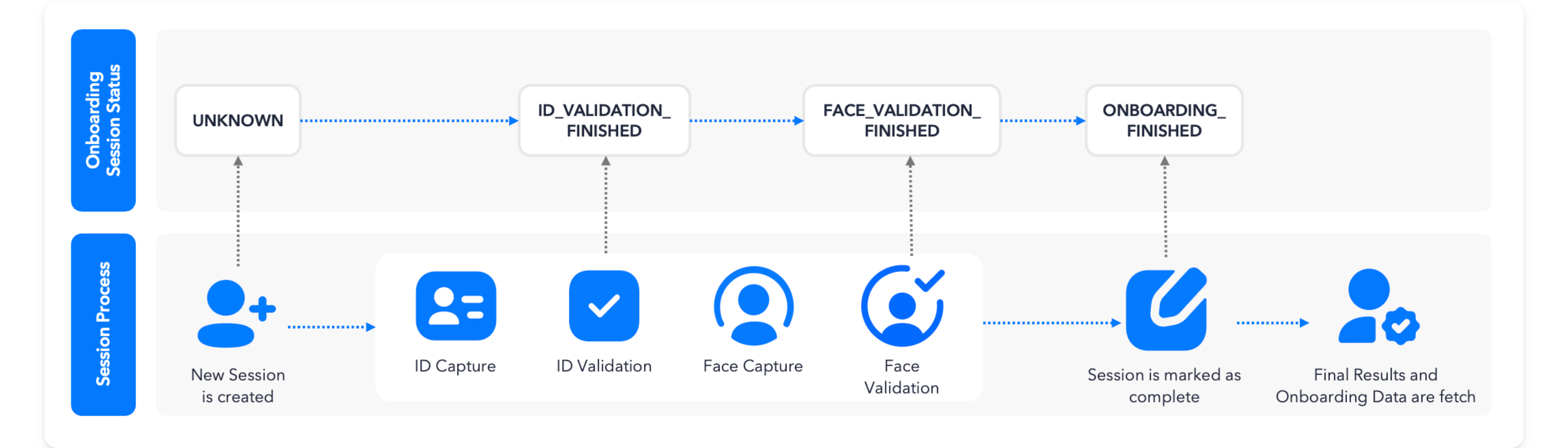
Possible statuses include:
UNKNOWN: Initial status. No data has been collected yet.ID_VALIDATION_FINISHED: ID document validation has finished. OCR data was extracted from the document. A score for this module has been calculated.POST_PROCESSING_FINISHED: ID post-processing has finished. This status is used in specific implementations where extra data review is required.FACE_VALIDATION_FINISHED: Face Match has been completed. This module compares the selfie captured with the photo from the ID document. A score for this module has been calculated.GOVERNMENT_VALIDATION_FINISHED: Validation against a third-party source of truth has finished. A score for this module has been calculated.ONBOARDING_FINISHED: The Onboarding Session has finished. The session has been marked "Completed." Scores and onboarding data are ready and can be fetched.MANUAL_REVIEW_APPROVED: A session that was in a _Needs Review state has been manually approved by a reviewer.MANUAL_REVIEW_REJECTED: A session that was in _Needs Review state has been manually rejected by a reviewer.
Get Onboarding Status
You can get the status of a specific Onboarding Session in one of two ways, depending on the integration type, application architecture, and your internal security policies. You can either:
- Poll the Omni API endpoint
/omni/get/onboarding/status. - Use the onboarding webhook notification.
Refer to Integrate by Platform for available options and integration guides.