# Workday Recruiting
This page covers Incode's identity verification integration with Workday. The integration uses facial biometrics, document authentication, and fraud detection to verify candidates during the hiring process.
***
## Workday Studio Integration
Incode provides a prebuilt Workday Studio integration package. It includes three independent Studio integrations, each covering a specific part of the onboarding and verification lifecycle:
- **eKYC Integration (INT00N\_eKYC\_Candidates\_Incode)**:** **Securely sends candidate data from Workday to Incode for
electronic Know Your Customer (eKYC) checks and writes results back.
- **IDV Integration (INT00N\_IDV\_Candidates\_Incode)**: Retrieves biometric and document verification results from Incode and writes them into Workday.
- **Email Delivery Integration (INT00N\_Onboarding\_Email\_Incode)**: Sends personalized onboarding URLs and verification links to candidates using Workday's notification framework.
Each integration is delivered as a Workday Studio project file ready for deployment. They are modular; you don't need to use both eKYC and IDV together.
***
## eKYC Integration
The `INT00N_eKYC_Candidates_Incode` integration sends candidate profile data from Workday to Incode for eKYC checks. Results are returned to Workday and stored on the candidate's **Incode Details** tab. You can place this integration at any of the following hiring stages: Assessment, Background Check, Offer, or Pre-Hire.
This integration:
- Extracts candidate demographic data from Workday.
- Sends the data securely to the Incode verification API.
- Retrieves risk scores, verification statuses, and supporting metadata.
- Updates the candidate's **Incode Details** tab in Workday.
***
## Email Delivery Integration
The `INT00N_Onboarding_Email_Incode` integration sends onboarding URLs and verification links to candidates using Workday's notification framework. You can place it at the Assessment, Background Check, Offer, or Hire stage.
This integration supports:
- Automated delivery of individualized onboarding URLs to candidates.
- Customizable email templates using Workday's notification framework.
- Flexible placement within hiring business processes.
### **Onboarding Notification Template**
The notification template lets HR and Talent Acquisition teams send candidates clear, personalized instructions. Using this template, you can:
- Personalize message content.
- Include dynamic fields.
- Embed the onboarding URL.
- Align with organizational branding.
> 📘 **Note**
>
> You can use a custom BP Notification Template to align notifications with your company's communication standards.
***
## IDV Integration
The `INT00N_IDV_Candidates_Incode` integration retrieves biometric and document verification results from Incode and writes them into Workday. It retrieves IDV results on a scheduled basis: hourly, daily, or as configured.
This integration:
- Opens candidate sessions with document and biometric submissions.
- Extracts verification attributes such as:
- Document authenticity validations
- Biometric (facial match) scores
- Fraud indicators
- Session timestamps and metadata
***
## eKYC Custom Object
The eKYC custom object stores identity verification data returned from Incode. It holds:
- Verification outcomes
- Risk categorization details
- Identity validation notes
- Incode session references
This object supports downstream consumption in reports, dashboards, audits, and compliance checks.
***
## IDV Custom Object
The IDV custom object stores document verification and biometric results from Incode. It holds:
- Document inspection results (authenticity, tampering indicators)
- Biometric comparison metrics (face match scores, liveness checks)
- Risk indicators derived from Incode's scoring engine
- Reference keys for reconciliation and traceability
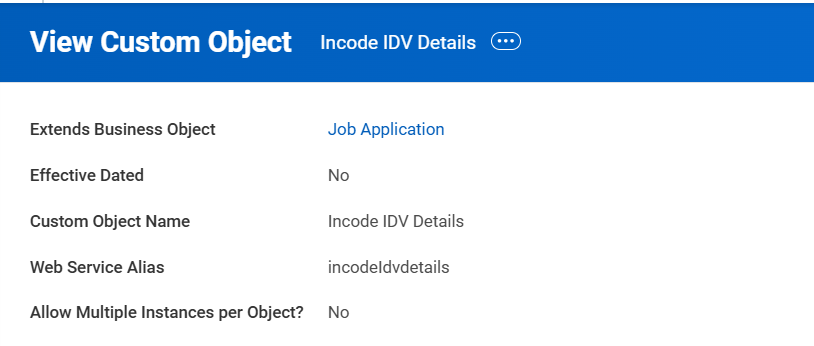
Figure 5.1: Custom Object for the IDV Details
***
## Integration Architecture
Data flows through the following pattern:
```
Workday → Workday Studio → Incode REST APIs → Workday Studio → Workday Custom Objects
```
The integration uses the following security measures:
- All data exchanged between Workday and Incode is encrypted over HTTPS.
- Authentication uses API keys stored securely in Workday's Integration System Credentials.
- Logging, retries, and exception tracing are built into the Studio integrations.