# Phone Number Input
The Phone Number Input module collects a user's phone number and can confirm phone ownership by sending a one-time password (OTP) via SMS.
For an overview of this module and how it works, see [Phone Number Input](https://developer.incode.com/docs/phone-number-input).
## Supported with:
:white_check_mark: Workflows | :white_check_mark: Flows
## Add Phone Number Input to Workflows
1. In the left menu. Select **Flow Builder** > **Workflows**.
2. Click **New** or select an existing Workflow.
3. From the Modules list, drag and drop the **Phone Number Input** module into the builder.
4. You can click the three dots > **Edit** on the module node to open the [Configuration Options](#configuration-options) panel and adjust settings as needed.
## Add Phone Number Input to Flows
1. In the left menu. Select **Flow Builder** > **Flows**.
2. Click **New** or select an existing Flow.
3. On the **Select Modules** tab, find the **Phone Number Input** module and click **Add**.
4. You can click **Details & Configurations** to open the [Configuration Options](#configuration-options) panel and adjust settings as needed.
## Configuration Options
After making changes, click **Save Configurations** to apply them.
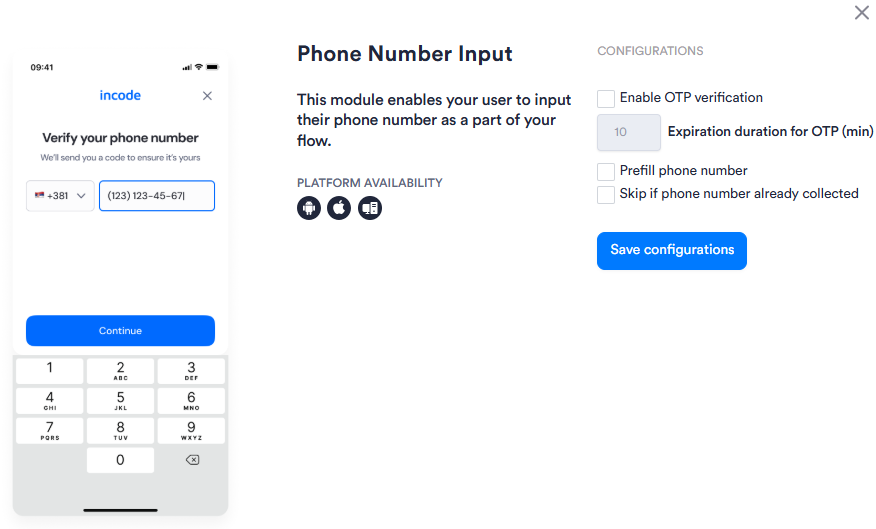
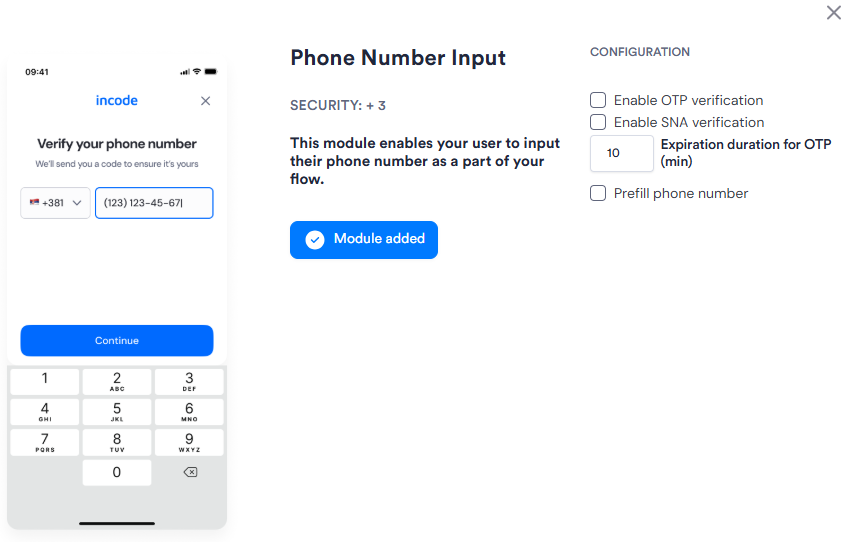
| Setting | Description |
| ---------------------------------------------------------------- | --------------------------------------------------------------------------------------------------------------------------------------------------------------------------------------------------------------------------- |
| **Enable OTP verification** | The user must confirm their phone number by entering a one-time password (OTP) sent via SMS before the module completes. |
| **Expiration duration for OTP (min)** | The number of minutes an OTP remains valid after it is sent. Default: _10_. |
| **Enable SNA verification**
_Flows only_ | Activates [Silent Network Authentication](https://developer.incode.com/docs/silent-network-authentication) as the primary verification method, with SMS OTP as an automatic fallback when SNA is unavailable. |
| **Prefill phone number** | Pre-populates the phone number field with a number already associated with the Session. Allows the user to review or edit it before continuing. |
| **Skip if phone number already collected**
_Workflows only_ | Skips this module if a phone number has already been collected in the Session. {/* TODO: Confirm with PM — confirm exact skip behavior and whether the previously collected number is passed through */} |