# ID Validation
The ID Validation module determines whether a submitted identity document is authentic. It analyzes the images captured by the [ID Capture](https://developer.incode.com/docs/id-capture) module against known parameters for the document type, runs a set of authenticity checks, and produces a validation result.
For an overview of this module and how it works, see [ID Validation](https://developer.incode.com/docs/id-validation-module).
## Supported with:
:white_check_mark: Workflows | :white_check_mark: Flows
## Add ID Validation to Workflows
1. In the left menu, click **Flow Builder** > **Workflows**.
2. Click **New** or select an existing Workflow.
3. Ensure the [ID Capture](https://developer.incode.com/docs/id-capture-dashboard) module is in your Workflow.
4. From the **Processes** list, drag and drop the **ID Validation** module into the builder after the ID Capture module.
5. You can click the three dots > **Edit** on the module node to open the [Configuration Options](#configuration-options) panel and adjust settings as needed.
## Add ID Validation to Flows
1. In the left menu, click **Flow Builder** > **Flows**.
2. Click **New** or select an existing Flow.
3. On the **Select Modules** tab, ensure the [ID Capture](https://developer.incode.com/docs/id-capture-dashboard) module is added to the Flow. After you add ID Capture, the ID Validation module becomes available.
4. For ID Validation, click **Add**.
5. You can click **Details & Configurations** to open the [Configuration Options](#configuration-options) panel and adjust settings as needed.
## Configuration Options
After making changes, click **Save Configurations** to apply them.
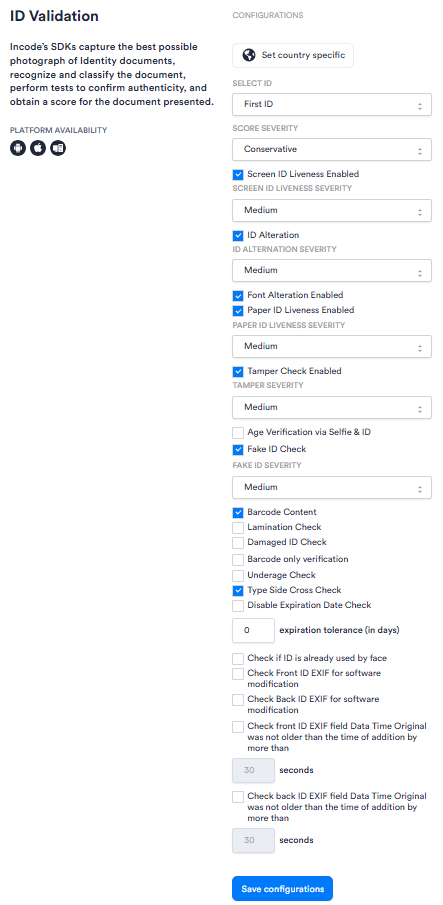
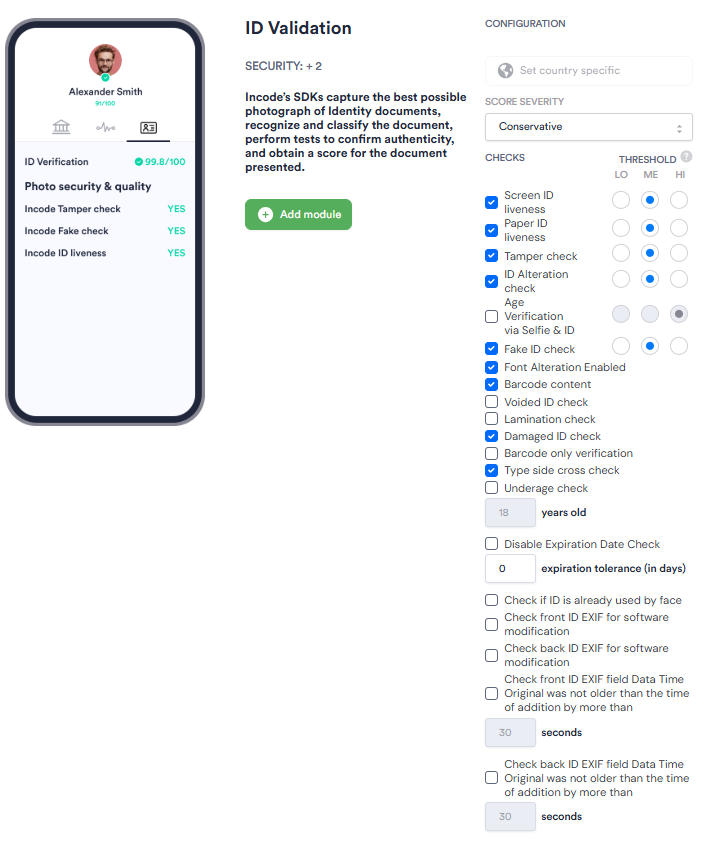
| Setting | Description |
| ------------------------------------------------------------------------------------------------------- | ----------------------------------------------------------------------------------------------------------------------------------------------------------------------------------------------------------------------------- |
| **_Set country specific_** | Restricts validation to documents issued by a specific country. Enable this when your use case requires country-level document validation. |
| **_Select ID_**
_Workflows only_ | Specifies which ID in a multi-ID session this module applies to; for example, _First ID_ or _Second ID_. Use this when your Workflow captures more than one identity document. |
| **_Score Severity_** | Sets the strictness threshold used to evaluate the overall validation score: _Soft_, _Relaxed_, _Medium_, or _Conservative_. {/* TODO: Confirm with PM what each threshold means for session outcomes */} |
| **_Screen ID Liveness Enabled_** | When enabled, checks whether the submitted ID was captured from a live physical document rather than a screen or digital display. |
| **_Screen ID Liveness Severity_** | Sets the strictness threshold for the Screen ID Liveness check: _Low_, _Medium_, or _High_. In Flows, this is the **_Threshold_** radio button. {/* TODO: Confirm with PM how available options affect pass/fail behavior */} |
| **_ID Alteration_** | When enabled, checks whether the ID has been digitally or physically altered. |
| **_ID Alteration Severity_** | Sets the strictness threshold for the ID Alteration check: _Low_, _Medium_, or _High_. In Flows, this is the **_Threshold_** radio button.{/* TODO: Confirm with PM how available options affect pass/fail behavior */} |
| **_Font Alteration Enabled_** | When enabled, checks for inconsistencies in font rendering that may indicate document tampering. |
| **_Paper ID Liveness Enabled_** | When enabled, checks whether the submitted ID is a physical paper or card document rather than a photocopy or printout. |
| **_Paper ID Liveness Severity_** | Sets the strictness threshold for the Paper ID Liveness check: _Low_, _Medium_, or _High_. In Flows, this is the **_Threshold_** radio button.{/* TODO: Confirm with PM how available options affect pass/fail behavior */} |
| **_Tamper Check Enabled_** | When enabled, checks the document for signs of physical or digital tampering. |
| **_Tamper Severity_** | Sets the strictness threshold for the Tamper check: _Low_, _Medium_, or _High_. In Flows, this is the **_Threshold_** radio button.{/* TODO: Confirm with PM how available options affect pass/fail behavior */} |
| **_Age Verification via Selfie & ID_** | When enabled, compares the apparent age of the user captured in a selfie against the date of birth on the submitted ID. |
| **_Fake ID Check_** | When enabled, checks whether the submitted document matches characteristics of known fake or fraudulent IDs. |
| **_Fake ID Severity_** | Sets the strictness threshold for the Fake ID Check: _Low_, _Medium_, or _High_. In Flows, this is the **_Threshold_** radio button.{/* TODO: Confirm with PM how available options affect pass/fail behavior */} |
| **_Barcode Content_** | When enabled, reads and validates the barcode on the ID as part of the authenticity check. |
| **_Voided ID check_**
_Flows only_ | When enabled, flags IDs that have been canceled. |
| **_Lamination Check_** | When enabled, checks for the presence of security lamination on the ID. |
| **_Damaged ID Check_** | When enabled, flags IDs that appear physically damaged in a way that may affect validation reliability. |
| **_Barcode only verification_** | When enabled, limits validation to barcode data only, skipping other visual checks. |
| **_Underage Check_** | When enabled, flags sessions where the date of birth on the submitted ID indicates the user is under the configured age threshold. |
| **_Type Side Cross Check_** | When enabled, verifies that the document type indicated on the front of the ID is consistent with data on the back. |
| **_Disable Expiration Date Check_** | When enabled, skips validation of the ID's expiration date. Use this to accept expired documents. |
| **_Expiration tolerance (in days)_** | The number of days past a document's expiration date that the system still accepts as valid. Default: 0. |
| **_Check if ID is already used by face_** | When enabled, checks whether the identity document has previously been submitted in a session associated with a different face. |
| **_Check Front ID EXIF for software modification_** | When enabled, inspects [EXIF](https://developer.incode.com/docs/glossary#exif) metadata on the front ID image to detect signs that the image was digitally modified using software. |
| **_Check Back ID EXIF for software modification_** | When enabled, inspects EXIF metadata on the back ID image to detect signs that the image was digitally modified using software. |
| **_Check front ID EXIF field Data Time Original was not older than the time of addition by more than_** | When enabled, validates that the front ID image's EXIF timestamp is within an acceptable window of the time it was submitted. The time window is set in seconds. The default is 30 seconds. |
| **_Check back ID EXIF field Data Time Original was not older than the time of addition by more than_** | When enabled, validates that the back ID image's EXIF timestamp is within an acceptable window of the time it was submitted. The time window is set in seconds. The default is 30 seconds. |