# ID Capture
The ID Capture module captures the front and back of a government-issued ID, with auto-capture and quality checks, and produces clean images for processing.
For an overview of this module and how it works, see [ID Capture](https://developer.incode.com/docs/id-capture).
## Supported with:
:white_check_mark: Workflows | :white_check_mark: Flows
## Add ID Capture to Workflows
1. In the left menu, click **Flow Builder** > **Workflows**.
2. Click **New** or select an existing Workflow.
3. From the Modules list, drag and drop the **ID Capture** module into the builder.
4. You can click the three dots > **Edit** on the module node to open the [Configuration Options](#configuration-options) panel and adjust settings as needed.
## Add ID Capture to Flows
1. In the left menu, click **Flow Builder** > **Flows**.
2. Click **New** or select an existing Flow.
3. On the **Select Modules** tab, find the **ID Capture** module and click **Add**.
4. You can click **Details & Configurations** to open the [Configuration Options](#configuration-options) panel and adjust settings as needed.
## Configuration Options
This section details all the configuration options available for this module. After changing anything, click **Save configurations** before closing the configuration panel.
The options you see in your configuration may differ from those documented below. Contact your Incode representative for more information.
### General
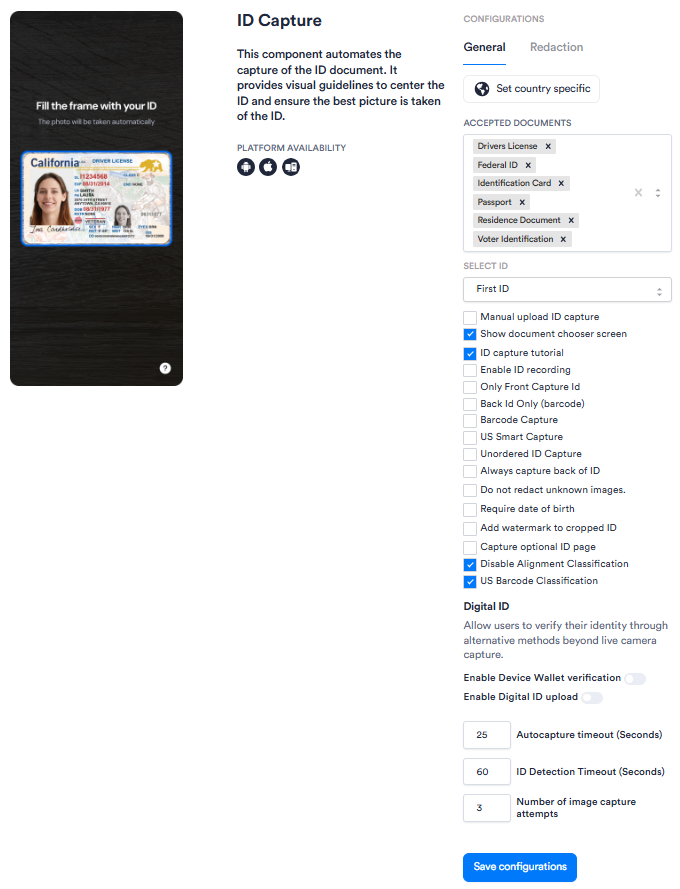
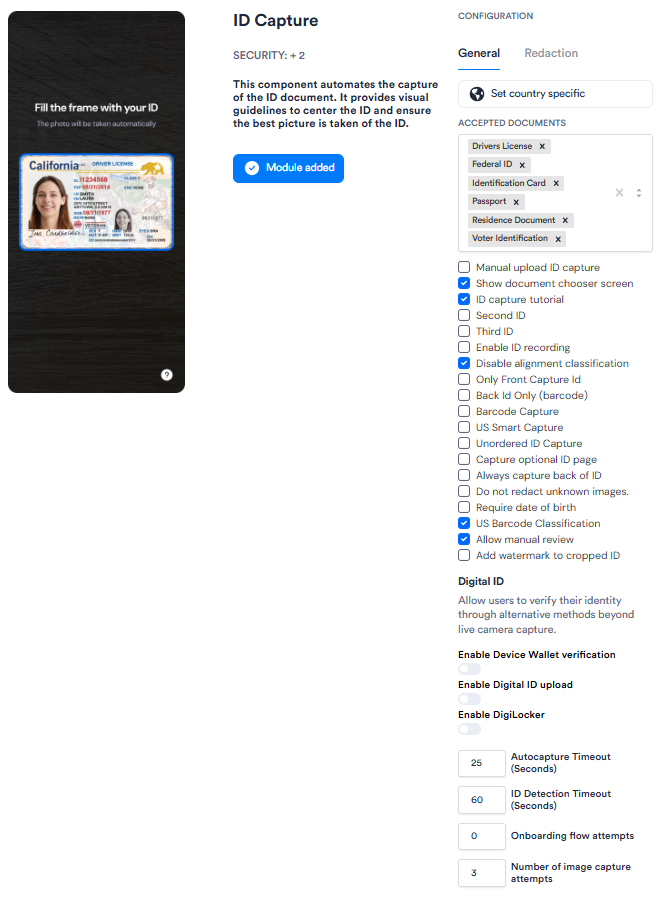
| Setting | Description |
| ------------------------------------------------ | ------------------------------------------------------------------------------------------------------------------------------------------------------------------------------------------------------------------------------------------------------------------------- |
| **_Set country specific_** | Restricts accepted document types to those issued by a specific country. Enable this when your use case requires country-level document validation. |
| **_Accepted Documents_** | The document types that users can present for ID capture. Select one or more from the available options (e.g., _Drivers License_, _Passport_, _Federal ID_). Only the selected document types will be accepted during the capture flow. |
| **_Select ID_**
_Workflows only_ | Specifies which ID in a multi-ID session this module applies to (_First ID_ or _Second ID_). Use this when your Workflow captures more than one identity document. |
| **_Second ID_**
_Flows only_ | When enabled, designates this ID Capture module as the second ID in a multi-ID session. Use this when your Flow captures more than one identity document. |
| **_Third ID_**
_Flows only_ | When enabled, designates this ID Capture module as the third ID in a multi-ID session. Use this when your Flow captures more than two identity documents. |
| **_Manual upload ID capture_** | When enabled, allows users to upload an image of their ID from their device instead of capturing it with the camera. |
| **_Show document chooser screen_** | When enabled, displays a screen prompting the user to select their document type before capture begins. Recommended when multiple document types are accepted. |
| **_ID capture tutorial_** | When enabled, displays an instructional screen before the capture step to guide the user through the process. |
| **_Enable ID recording_** | When enabled, records the ID capture session for review purposes. |
| **_Only Front Capture Id_** | When enabled, captures only the front of the ID, skipping the back. Use this for document types that do not require a back-side scan. |
| **_Back Id Only (barcode)_** | When enabled, captures only the back of the ID and reads the barcode. Use this when only barcode data from the back of the ID is required. |
| **_Barcode Capture_** | When enabled, activates barcode scanning during ID capture. |
| **_US Smart Capture_** | When enabled, uses enhanced capture logic optimized for US-issued identity documents. |
| **_Unordered ID Capture_** | When enabled, allows the front and back of the ID to be captured in any order, rather than requiring front first. |
| **_Always capture back of ID_** | When enabled, always requires capture of the back of the ID, regardless of document type. |
| **_Do not redact unknown images_** | When enabled, prevents redaction of images that cannot be identified as a known document type. By default, unidentified images are redacted. |
| **_Require date of birth_** | When enabled, users will be prompted to scan the back of their ID if date of birth is not detected on the front side. This applies even when the flow is configured as front-only capture, and ensures date of birth is always extracted regardless of document template. |
| **_Capture optional ID page_** | When enabled, prompts the user to capture an additional optional page of the ID (e.g., a visa page). |
| **_Disable Alignment Classification_** | When enabled, turns off alignment classification during capture, which checks that the ID is properly aligned before accepting the image. Disabling this may speed up capture but can reduce image quality. |
| **_US Barcode Classification_** | When enabled, uses barcode classification logic specific to US-issued documents. |
| **_Allow manual review_**
_Flows only_ | {/* TODO: Confirm with PM — exact behavior of this setting, including who performs the review and at what point in the capture flow */} |
| **_Add watermark to cropped ID_** | When enabled, adds watermark text to cropped ID images to indicate they have been processed. |
| **_Enable Device Wallet verification_** | When enabled, allows users to verify their identity using a digital ID stored in their device wallet (e.g., Apple Wallet, Google Wallet) as an alternative to camera capture. |
| **_Enable Digital ID upload_** | When enabled, allows users to submit a digital ID file as an alternative to live camera capture. |
| **_Enable DigiLocker
Flows only_** | When enabled, lets users verify their identity through DigiLocker. {/* TODO: Confirm with PM — DigiLocker is the Indian government digital document service; confirm scope, supported document types, and any provisioning requirements */} |
| **_Autocapture timeout (Seconds)_** | The number of seconds the camera will attempt automatic capture before timing out. Default: _25_. If autocapture does not succeed within this window, the user is prompted to retry or switch to manual capture. |
| **_ID Detection Timeout (Seconds)_** | The number of seconds the system will attempt to detect an ID in the camera frame before timing out. Default: _60_. |
| **_Onboarding flow attempts_**
_Flows only_ | The number of onboarding attempts after which the user drops off. Default: _0_. {/* TODO: Confirm with PM — how this differs from "Number of image capture attempts" and what a value of 0 means (unlimited, or drop off immediately) */} |
| **_Number of image capture attempts_** | The maximum number of times a user can attempt to capture their ID before the session ends. Default: _3_. |
### Redaction
The Redaction tab lets you define which fields should be redacted on captured identity documents, configured per country. Each country entry specifies the document type, the document subtype (the specific version or format of that document), the issuing year (which identifies the document version and determines which fields are available for redaction), and the fields to redact. You can add multiple country configurations to a single session using the **Add country** button.
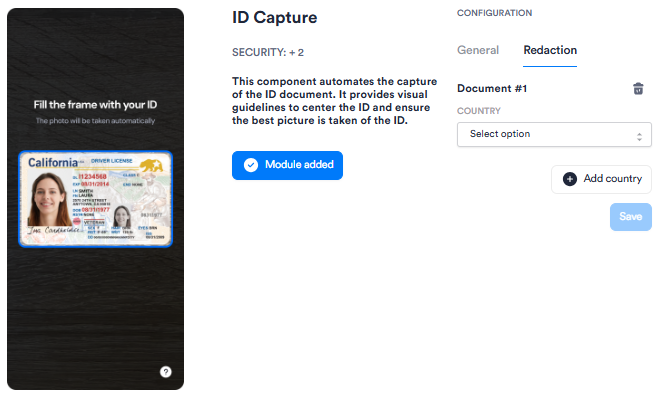
The following countries are available for redaction configuration. All country entries use **State: ALL**.
#### Norway
| Document type | Subtype | Issuing year | Fields to be redacted |
| ------------------- | --------------------- | ------------ | ------------------------- |
| Identification Card | `IDENTIFICATION_CARD` | 2015 | `creditCardNumber`, `ccv` |
#### Indonesia
| Document type | Subtype | Issuing year | Fields to be redacted |
| ------------------- | --------------------- | ---------------- | --------------------- |
| Identification Card | `IDENTIFICATION_CARD` | 2000 | `documentNumber` |
| Passport | `NATIONAL_PASSPORT` | 2013, 2015, 2022 | `documentNumber` |
#### Germany
| Document type | Subtype | Issuing year | Fields to be redacted |
| ------------------- | ----------------------- | ------------ | ----------------------------- |
| Identification Card | `IDENTIFICATION_CARD` | 2007 | `documentNumber` |
| Identification Card | `IDENTIFICATION_CARD` | 2010, 2021 | `documentNumber`, `refNumber` |
| Identification Card | `TEMP_GERMAN_IDCARD` | 2004 | `documentNumber` |
| Passport | `NATIONAL_PASSPORT` | 2007, 2017 | `documentNumber` |
| Residence Document | `RESIDENCE_PERMIT` | 2011, 2019 | `documentNumber`, `refNumber` |
| Residence Document | `FICTIONAL_CERTIFICATE` | 2020, 2024 | `documentNumber` |
#### Hong Kong
| Document type | Subtype | Issuing year | Fields to be redacted |
| ------------------ | ----------------------------- | ------------ | ---------------------------------- |
| Passport | `NATIONAL_PASSPORT` | 2005 | `documentNumber`, `personalNumber` |
| Residence Document | `PERMANENT_RESIDENT_IDENTITY` | 2003, 2018 | `documentNumber` |
#### Netherlands
| Document type | Subtype | Issuing year | Fields to be redacted |
| ------------------- | -------------------------------- | ---------------------------- | --------------------- |
| Identification Card | `DIPLOMATIC_IDENTIFICATION_CARD` | 2016 | `personalNumber` |
| Identification Card | `IDENTIFICATION_CARD` | 2014 | `personalNumber` |
| Passport | `NATIONAL_PASSPORT` | 2006, 2014 | `personalNumber` |
| Residence Document | `RESIDENCE_PERMIT` | 2014, 2020, 2022 | `personalNumber` |
| Drivers License | `DRIVER_LICENSE` | 1990, 2006, 2013, 2018, 2025 | `personalNumber` |
#### Japan
| Document type | Subtype | Issuing year | Fields to be redacted |
| ------------------- | --------------------- | ------------ | --------------------- |
| Identification Card | `IDENTIFICATION_CARD` | 2020 | `personalNumber` |
#### Thailand
| Document type | Subtype | Issuing year | Fields to be redacted |
| ------------------- | --------------------- | ------------ | --------------------- |
| Identification Card | `IDENTIFICATION_CARD` | 2001 | `religion` |
#### Singapore
| Document type | Subtype | Issuing year | Fields to be redacted |
| ------------------- | ------------------------------ | ------------ | ---------------------------------- |
| Identification Card | `IDENTIFICATION_CARD` | 2001 | `documentNumber` |
| Passport | `NATIONAL_PASSPORT` | 2005, 2017 | `documentNumber`, `personalNumber` |
| Residence Document | `RESIDENCE_PERMIT` | 2005 | `documentNumber` |
| Drivers License | `DRIVER_LICENSE` | 2002 | `documentNumber` |
| Military | `MILITARY_IDENTIFICATION_CARD` | 2010 | `documentNumber` |
#### Korea, Republic of
| Document type | Subtype | Issuing year | Fields to be redacted |
| ------------------- | --------------------- | ------------ | ---------------------------------- |
| Identification Card | `IDENTIFICATION_CARD` | 2000 | `personalNumber` |
| Passport | `NATIONAL_PASSPORT` | 2008, 2022 | `documentNumber`, `personalNumber` |
| Residence Document | `RESIDENCE_PERMIT` | 2018, 2023 | `documentNumber` |
| Drivers License | `DRIVER_LICENSE` | 2000, 2020 | `documentNumber`, `personalNumber` |