The Government Data Verification module validates identity data extracted from a user's ID against an authoritative government registry. The process runs in the background and isn't visible to the user.
For an overview of this module and how it works, see Government Data Verification.
Supported with:
:x: Workflows | :white_check_mark: Flows
Add Government Data Verification to Flows
- In the left menu, click Flow Builder > Flows.
- Click New or select an existing Flow.
- On the Select Modules tab, find the Government Data Verification module and click Add.
- You can click Details & Configurations to open the Configuration Options panel and adjust settings as needed.
Configuration Options
The options you see in your configuration may differ from those documented below. Contact your Incode representative for more information.
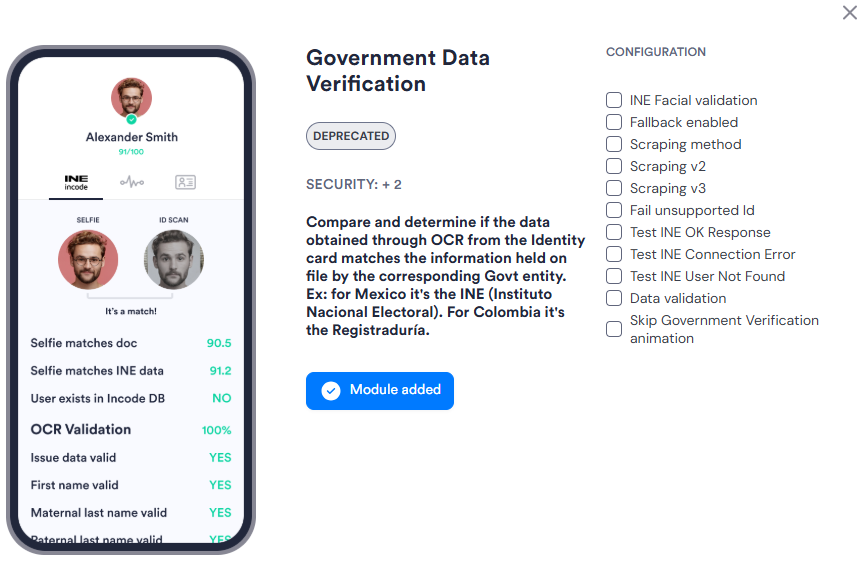
| Setting | Description |
|---|---|
| INE Facial validation | Performs facial validation against Mexico's INE (Instituto Nacional Electoral) government registry. Requires facial validation to be available for the selected country under the client's contract. |
| Fallback enabled | Switches to an alternative provider or method if the primary government data source is unavailable. |
| Scraping method | Skips the direct connection check and runs validation using scraping v1 instead. Scraping retrieves verification results by querying a government system using an automated scraper rather than a direct integration. Used as a workaround when a direct provider integration is unavailable. |
| Scraping v2 | Runs an upgraded scraping-based validation asynchronously against the Incode scraper service. Used when direct connection is unavailable or fails. |
| Scraping v3 | Runs scraping-based validation synchronously, returning an immediate response. Use this when a synchronous result is required. Scraping v1 and v2 run asynchronously. |
| Fail unsupported Id | Returns a failure result for document types that are not supported by the configured government provider. When disabled, unsupported documents are passed without a government check. |
| Test INE OK Response | Simulates a successful response from the INE provider. Use for testing purposes only. |
| Test INE Connection Error | Simulates a connection error from the INE provider. Use for testing purposes only. |
| Test INE User Not Found | Simulates a not-found response from the INE provider. Use for testing purposes only. |
| Data validation | Compares biographic fields—such as document number, personal number, date of birth, and name—against the government registry. |
| Skip Government Verification animation | Hides the verification animation from the user during processing. Use this to run the module silently without surfacing verification activity in the UI. |