# External Decision
The External Decision module calls a configured external endpoint and exposes the returned decision value for routing [Conditions](https://developer.incode.com/update/docs/configure-workflow-conditions).
For an overview of this module and how it works, see [External Decision](https://developer.incode.com/docs/external-decision).
## Supported with:
:white_check_mark: Workflows | :x: Flows
## Prerequisites
Before adding the External Decision node to a Workflow, the client must:
- Expose an endpoint that accepts the Incode payload (`sessionId`, `identityId`, `flowId`, `timestamp`) and returns a single `decision` string.
- Secure the endpoint with OAuth 2.0 (client credentials) and issue Incode a Client ID and Client Secret.
- Define the set of `decision` values the endpoint will return (for example, `valid`, `blocked`, `on_hold`). These exact strings are used when configuring routing conditions.
## Add External Decision to Workflows
1. In the left menu, click **Flow Builder** > **Workflows**.
2. Click **New** or select an existing Workflow.
3. Ensure you have at least one Module node in the builder.
4. From the **Processes** list, drag and drop the **External Decision** module into the builder. Place it after an authentication module only if the decision depends on `identityId`.
5. Click the three dots > **Edit** on the node to open the [Configuration Options](#configuration-options) panel and configure the endpoint, authentication, and routing.
## Configuration Options
After making changes, click **Save configurations** to apply them.
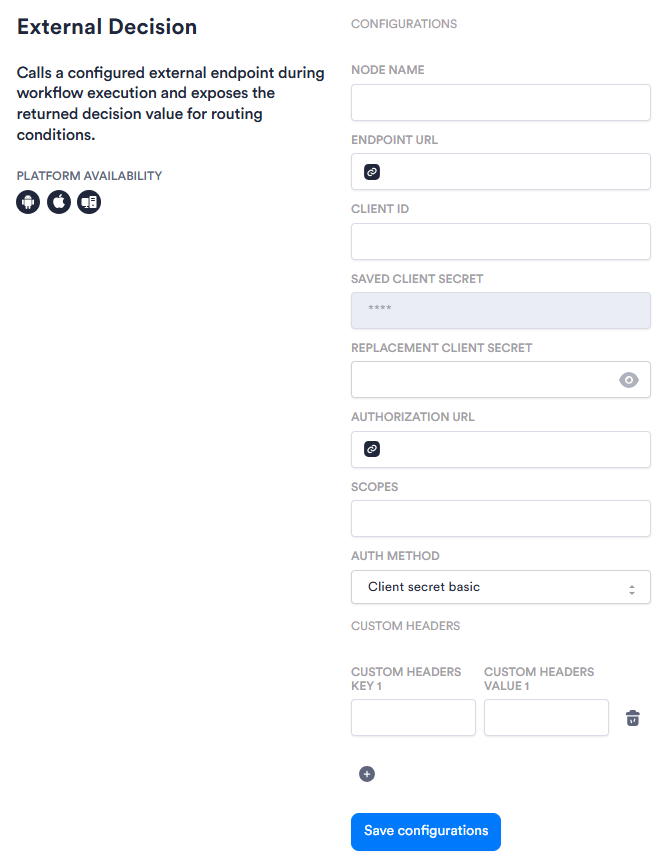
The options you see in your configuration may differ from those documented below. Contact your Incode representative for more information.
| Setting | Description |
| ------------------------------- | -------------------------------------------------------------------------------------------------------------------------------------------------------------------------------------------------------------------------------------------- |
| **_Node Name_** | The reference used for this node in routing conditions (for example, _eligibility\_status_). Conditions act on the returned decision string using this name as the reference. |
| **_Endpoint URL_** | The client-owned endpoint that Incode calls when the Workflow reaches this node. |
| **_Client ID_** | The identifier the client issues to Incode for the OAuth client-credentials grant. |
| **_Saved Client Secret_** | Displays the masked Client Secret currently saved for this node. Read-only. To change the value, enter a new one in **_Replacement Client Secret_**. |
| **_Replacement Client Secret_** | Enter a new Client Secret value here to replace the one currently saved. Use the visibility toggle to ensure your new secret is correct before saving. After you click **Save configurations**, the value is masked. |
| **_Authorization URL_** | The client's OAuth token endpoint. Incode requests an access token from this URL on each execution. |
| **_Scopes_** | The OAuth scopes Incode requests when obtaining an access token. |
| **_Auth Method_** | How Incode presents its credentials to the token endpoint. Options are _Client secret basic_ and _Client secret post_. |
| **_Custom Headers_** | Optional static headers that Incode sends as-is on every request to the endpoint (for example, an API gateway key). Add additional key/value pairs using the **+** button.
Custom header values are not masked in the configuration UI. |
## Add a Condition
After configuring the module, add [Condition](https://developer.incode.com/docs/configure-workflow-conditions) nodes that act on the returned `decision` string. Reference the node by the **_Node Name_** configured above (for example, `eligibility_status == "valid"`).
Example routing for a status look-up:
- `valid` → continue to the next module
- `blocked` → block access
- `on_hold` → trigger step-up identity verification
- `INCODE_UNRESOLVED` → handle failure (no response within 30 seconds, error, unavailable endpoint, or unmatched value)
Decision string matching is case-sensitive. Returned values must exactly match the strings configured in conditions, or the outcome maps to `INCODE_UNRESOLVED`.
## Observability
A session event is emitted on every execution, capturing the endpoint called, the decision value, the optional `reason` field if returned, and the branch taken. Credentials are never exposed in logs or the flow definition.