# eKYB
This module verifies the identity and legitimacy of a business by matching business details submitted by the end user against records in recognized government and commercial data sources. The fields collected depend on the country the end user selects.
## Supported with:
:white_check_mark: Workflows | :white_check_mark: Flows
Prefill is currently supported only in Flows. See [Configuration Options](#configuration-options).
## Add eKYB to Workflows
1. In the left menu, click **Flow Builder** > **Workflows**.
2. Click **New** or select an existing Workflow.
3. From the Modules list, drag and drop the **eKYB** module into the builder.
4. You can click the three dots > **Edit** on the module node to open the [Configuration Options](#configuration-options) panel and adjust settings as needed.
## Add eKYB to Flows
1. In the left menu, click **Flow Builder** > **Flows**.
2. Click **New** or select an existing Flow.
3. On the **Select Modules** tab, find the **eKYB** module and click **Add**.
4. You can click **Details & Configurations** to open the [Configuration Options](#configuration-options) panel and adjust settings as needed.
## Configuration Options
This section details all the configuration options available for this module. After changing anything, click **Save configurations** before closing the configuration panel.
The options you see in your configuration may differ from those documented below. Contact your Incode representative for more information.
The eKYB module supports two configuration options: **Verification** and **Prefill**. Switch between the two using the tabs at the top of the configuration panel.
### Verification
Verification is the core business identity check. The end user submits business details (business name, tax ID, address, and optionally UBOs and directors), and the system verifies the submitted values against a source of truth. The response includes match results for each submitted field, along with enrichment details (registration status and entity type) where available.
For request and response schemas, supported countries, and per-country details, see the [eKYB Verification Coverage](https://developer.incode.com/docs/ekyb-verification-coverage) and [eKYB Verification API Reference](https://developer.incode.com/docs/ekyb-verification-api-reference) pages.
The field checkboxes control which fields are collected from the end user and submitted for verification. The end user selects the country in the flow itself; there is no country selector in the module configuration.
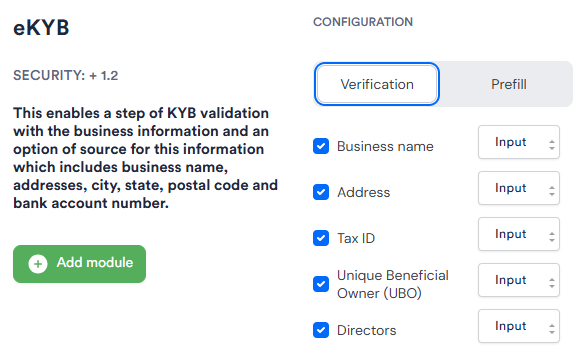
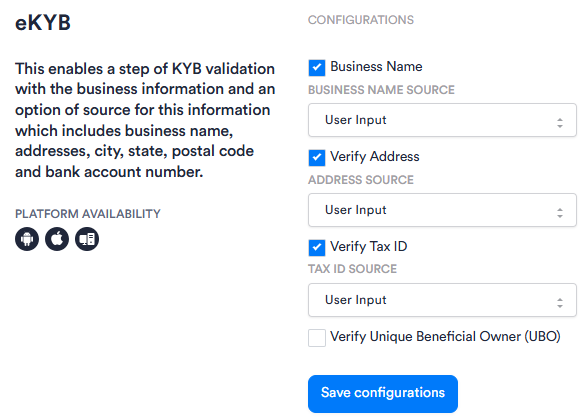
| Setting | Description |
| ----------------------------- | --------------------------------------------------------------------------------------------------------------- |
| Business name | When enabled, the end user is asked to provide the business name. |
| Address | When enabled, the end user is asked to provide the business address. |
| Tax ID | When enabled, the end user is asked to provide the business tax ID. |
| Unique Beneficial Owner (UBO) | When enabled, the end user is asked to provide the full legal names of the business's Unique Beneficial Owners. |
| Directors | When enabled, the end user is asked to provide the full legal names of the business's directors. |
Not all fields are supported by every country. See the country page for each country's supported fields. Country pages are listed on the [eKYB Verification Coverage](https://developer.incode.com/docs/ekyb-verification-coverage) page.
### Prefill
Prefill is an enrichment option that reduces end user friction. The end user submits only the tax ID and business name, and the system looks up the business in official registries and returns additional details (registered address, entity type, and other authoritative data) for pre-fill. Prefill does not verify submitted values against a source of truth; it retrieves and returns data.
Prefill is currently available only in Flows, and only for Mexico.
For request and response schemas, supported countries, and per-country details, see the [eKYB Prefill Coverage](https://developer.incode.com/docs/ekyb-prefill-coverage) and [eKYB Prefill API Reference](https://developer.incode.com/docs/ekyb-prefill-api-reference) pages.
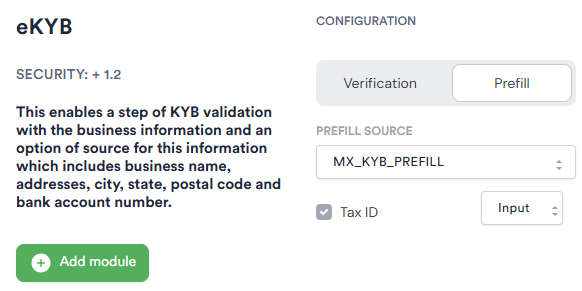
| Setting | Description |
| -------------- | ---------------------------------------------------------------------------------------------- |
| Prefill source | The prefill source to use. Currently the only available option is `MX_KYB_PREFILL` for Mexico. |
| Tax ID | When enabled, the end user is asked to provide the business tax ID. |
## Add Conditions
[Conditions](https://developer.incode.com/docs/configure-workflow-conditions) let you branch the Workflow based on the eKYB verification result. When adding a Condition after the eKYB module, search, filter, or browse for the **eKYB** section in the first drop-down and select from the following options:
| Condition | Description |
| ------------------------------ | --------------------------------------------------------------------------------------------------------------------------------------- |
| Address deliverability | The USPS deliverability status for the submitted business address. Possible values: _DELIVERABLE_, _UNDELIVERABLE_. |
| Unique beneficial owners count | The number of Unique Beneficial Owners associated with the business. Supports comparison operators. Possible values: any numeric value. |
| TaxID verification | The match status for the submitted tax ID. Possible values: _VERIFIED_, _APPROXIMATE MATCH_, _UNVERIFIED_. |
| Ubo name match | The match status for the submitted UBO names. Possible values: _VERIFIED_, _APPROXIMATE MATCH_, _UNVERIFIED_. |
| Address verification | The match status for the submitted business address. Possible values: _VERIFIED_, _APPROXIMATE MATCH_, _UNVERIFIED_. |
| Business name | The match status for the submitted business name. Possible values: _VERIFIED_, _APPROXIMATE MATCH_, _UNVERIFIED_. |
| Address property type | The property type of the submitted business address. Possible values: _RESIDENTIAL_, _COMMERCIAL_. |
{/* TODO: Confirm with PM — the eKYB Conditions drop-down does not appear to include a Director name match Condition, even though director name match is a supported response field for several countries. Confirm whether this is intended or a gap. */}
{/* TODO: The Dashboard drop-downs currently show status values including SIMILAR MATCH and ALTERNATE NAME on some Conditions; PM confirmed these are incorrect and are being fixed. This table documents the correct Verified/Approximate Match/Unverified values. Verify against Dashboard once the fix ships. */}