# Custom Fields
The Custom Fields module captures additional user-provided data and saves it to the Session, making it available for reporting, server-side decisions, or cross-checking later in the journey.
###
This module is deprecated. Existing implementations may continue use, but it is not available in new implementations.
Before adding this module, make sure you've [defined your custom fields](https://developer.incode.com/docs/configuration-general-tab#manage-custom-fields) in Dashboard in **Configuration > General**. Each field requires a name and a type. Once defined, those fields appear as selectable options in the module configuration panel.
For an overview of this module and how it works, see [Custom Fields](https://developer.incode.com/docs/custom-fields).
## Supported with:
:x: Workflows | :white_check_mark: Flows
## Add Custom Fields to Flows
1. In the left menu, click **Flow Builder** > **Flows**.
2. Click **New** or select an existing Flow.
3. On the **Select Modules** tab, find the **Custom Fields** module and click **Add**.
4. You can click **Details & Configurations** to open the [Configuration Options](#configuration-options) panel and adjust settings as needed.
### Note
Adding the module enables the UI-collection path. Users will be prompted to complete the fields during the Flow. If you don't add the module, the field values must instead be supplied through the backend [via API](https://developer.incode.com/reference/addcustomfields).
## Configuration Options
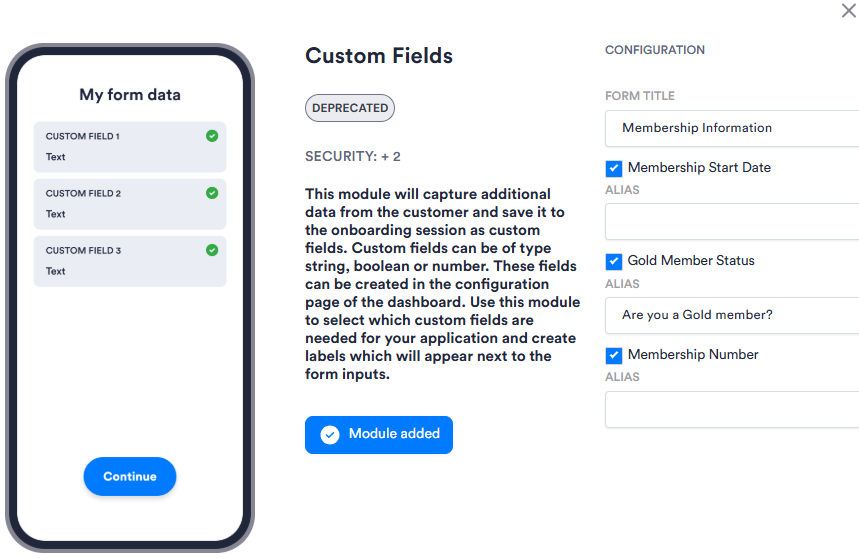
| Setting | Description |
| ---------------------------------------------------- | ---------------------------------------------------------------------------------------------------- |
| **_Form Title_** | The heading shown at the top of the form presented to the user. |
| **_Custom field checkboxes (field names variable)_** | The fields available to include. Select the checkbox for each field you want to include in the form. |
| **_Alias_** | An optional override for the field's display label. If left blank, the field's name is used. |